Join us at FabCon Atlanta from March 16 - 20, 2026, for the ultimate Fabric, Power BI, AI and SQL community-led event. Save $200 with code FABCOMM.
Register now!The Power BI Data Visualization World Championships is back! Get ahead of the game and start preparing now! Learn more
Hi,
I am trying to call a table function in our SQL database and it is expecting smalldatetime but Power Query Editor always return this error:
DataSource.Error: Microsoft SQL: The conversion of a datetime2 data type to a smalldatetime data type resulted in an out-of-range value.
Details:
DataSourceKind=SQL
DataSourcePath=******
Message=The conversion of a datetime2 data type to a smalldatetime data type resulted in an out-of-range value.
ErrorCode=-2146232060
Number=242
Class=16
Below is my attempt (sensitive data is masked with XXXX):
let
Source = Sql.Database(XXXX, XXXXXX),
dbo_Report = Source{[Schema="dbo",Item="Report"]}[Data],
#"Invoked Function" = dbo_Report(XXXXX, #datetime(2000,1,1,0,0,0) , #datetime(2080,1,1,0,0,0))
in
#"Invoked Function"
Solved! Go to Solution.
Hi @hale
It is because the value #datetime(2080,1,1,0,0,0) you passed in the function is out of the range of smalldatetime type. I guess the column in your SQL Server table is set to smalldatetime type, so it cannot accept this value, which leading to this error.
Please refer to this official doc:smalldatetime (Transact-SQL) - SQL Server
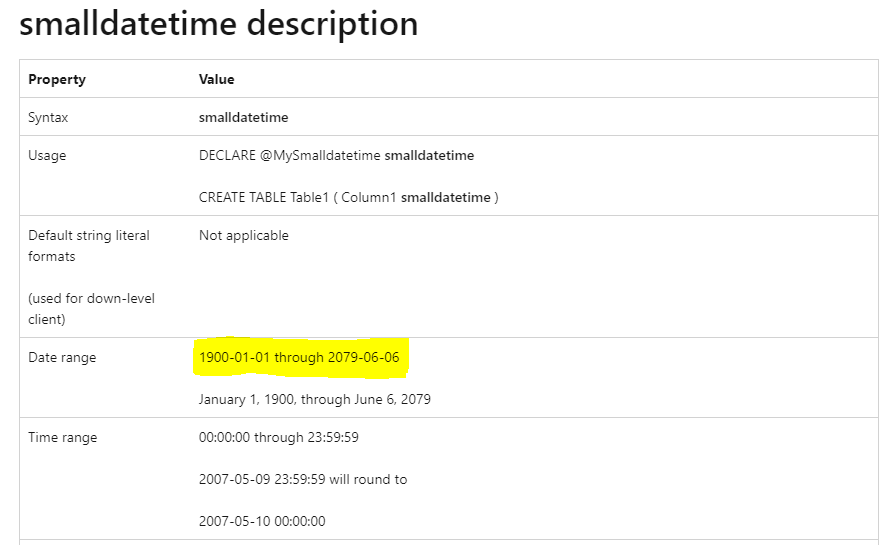
Date & time data type value range
| Data type | Date & Time Range |
| datetime | 1753-01-01 00:00:00 ~ 9999-12-31 23:59:59.997 |
| datetime2 | 0001-01-01 00:00:00 ~ 9999-12-31 23:59:59.9999999 |
| date | 0001-01-01 ~ 9999-12-31 |
| smalldatetime | 1900-01-01 00:00:00 ~ 2079-06-06 23:59:59 |
To resolve it, please pass a smaller value than #datetime(2079,6,6,23,59,59), or change the column data type to datetime or datetime2 type in your SQL Server table.
Best Regards,
Community Support Team _ Jing
If this post helps, please Accept it as Solution to help other members find it.
Hi @hale
It is because the value #datetime(2080,1,1,0,0,0) you passed in the function is out of the range of smalldatetime type. I guess the column in your SQL Server table is set to smalldatetime type, so it cannot accept this value, which leading to this error.
Please refer to this official doc:smalldatetime (Transact-SQL) - SQL Server
Date & time data type value range
| Data type | Date & Time Range |
| datetime | 1753-01-01 00:00:00 ~ 9999-12-31 23:59:59.997 |
| datetime2 | 0001-01-01 00:00:00 ~ 9999-12-31 23:59:59.9999999 |
| date | 0001-01-01 ~ 9999-12-31 |
| smalldatetime | 1900-01-01 00:00:00 ~ 2079-06-06 23:59:59 |
To resolve it, please pass a smaller value than #datetime(2079,6,6,23,59,59), or change the column data type to datetime or datetime2 type in your SQL Server table.
Best Regards,
Community Support Team _ Jing
If this post helps, please Accept it as Solution to help other members find it.
Hi Jing,
That's exactly the issue. However I dont have any control over SQL database so Im looking for something I can do from Power BI side.
Is there anything else that I can try?
Hi @hale
Is this function used to filter rows between those two dates? If the column doesn't hold date values after 2079-06-06 in the SQL table, you can pass an earlier date in the function. Is this possible to solve it?
Best Regards,
Community Support Team _ Jing
oh thanks, it actually is working. The 2 parameters I can pass in like this and it works:
#datetime(2000,1,1,1,1,1) , #datetime(2022,1,5,1,1,1)Cheers,
Ha Le
Check out the November 2025 Power BI update to learn about new features.
Advance your Data & AI career with 50 days of live learning, contests, hands-on challenges, study groups & certifications and more!
| User | Count |
|---|---|
| 10 | |
| 6 | |
| 5 | |
| 4 | |
| 2 |