
cancel
Showing results for 
Search instead for 
Did you mean: 

Get Fabric certified for FREE! Don't miss your chance! Learn more

Reply
jiangxm80
Helper I
Helper I

Error when expanding the column

when I expand the Table column, there would show some error. 

PowerBI Error.PNG

Table.ExpandTableColumn(Source, "KeyWords", {"Name"}, {"Name"})


Would someone help on this? Thanks a lot!

1 ACCEPTED SOLUTION
v-kkf-msft
Community Support
Community Support

Hi @jiangxm80 ,


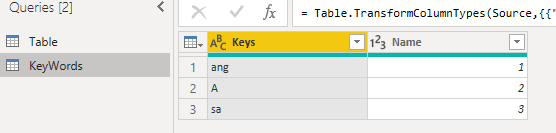
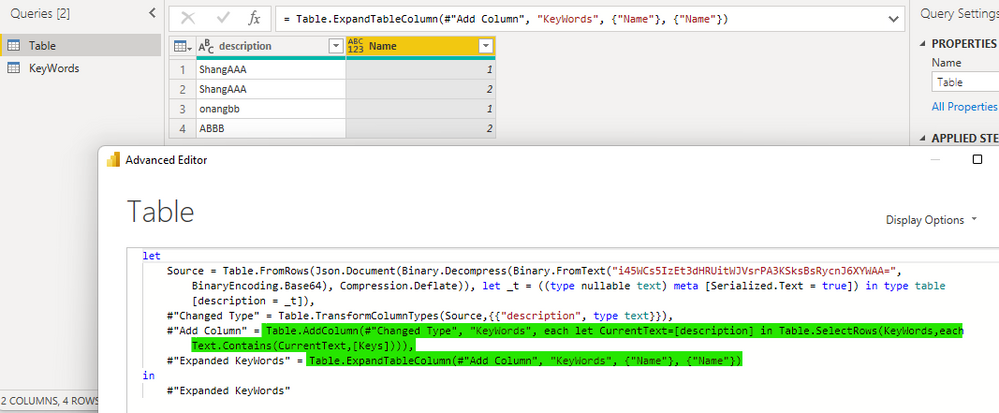
I tested with the following example data, but it works fine. Could you please share your sample data?


vkkfmsft_0-1654826027212.png

vkkfmsft_1-1654826117978.png


Best Regards,
Winniz


View solution in original post

3 REPLIES 3
v-kkf-msft
Community Support
Community Support

Hi @jiangxm80 ,


I tested with the following example data, but it works fine. Could you please share your sample data?


vkkfmsft_0-1654826027212.png

vkkfmsft_1-1654826117978.png


Best Regards,
Winniz


Thanks, I just found that error was not due to that Table field, but another releated one. I have got the issue resolved. 

jiangxm80
Helper I
Helper I

The Table column "KeyWord" was created via the following.

Table.AddColumn(#"Expanded owninguser_appointment", "KeyWords", each let CurrentText=[description] in Table.SelectRows(KeyWords,each Text.Contains(CurrentText,[Keys])))

Helpful resources

Announcements
Join our Fabric User Panel

Join our Fabric User Panel

Share feedback directly with Fabric product managers, participate in targeted research studies and influence the Fabric roadmap.

FabCon Atlanta 2026 carousel

FabCon Atlanta 2026

Join us at FabCon Atlanta, March 16-20, for the ultimate Fabric, Power BI, AI and SQL community-led event. Save $200 with code FABCOMM.