
cancel
Showing results for 
Search instead for 
Did you mean: 

The Power BI Data Visualization World Championships is back! It's time to submit your entry. Live now!

Reply
Anonymous
Not applicable

Error in JSON InputFile

Hi All,


I have an issue with a JSON file I import from an API call.

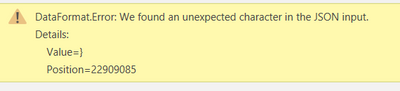
But it gives me the following error : 

Robin666_0-1614266378046.png


I have noticed that the JSON contains some unsupported "Ascii" types, whats makes it return this error. 
Is there any way to convert these values to text, BEFORE/WHILE loaded into Power BI? 
I know the function Text.FromBinary, but don't think it will help me out in this case.


let
    Source = Json.Document(Web.Contents("https://XXX.service-now.com/api/now/table/change_request")),
    #"Converted to Table" = Table.FromRecords({Source}),
    #"Expanded result" = Table.ExpandListColumn(#"Converted to Table", "result"),


Will this only be possible through adjusting my API ? 

@ImkeF , I know you are the MQuery legend here, any idea? 

regards,


Robbe


3 REPLIES 3
ImkeF
Community Champion
Community Champion

Hi @Anonymous ,

it would be: 

let
    Source= Text.FromBinary(Web.Contents("https://XXX.service-now.com/api/now/table/change_request"))

But be warned: This is going to be a rabbithole!!


Imke Feldmann (The BIccountant)

If you liked my solution, please give it a thumbs up. And if I did answer your question, please mark this post as a solution. Thanks!

How to integrate M-code into your solution -- How to get your questions answered quickly -- How to provide sample data -- Check out more PBI- learning resources here -- Performance Tipps for M-queries

ImkeF
Community Champion
Community Champion

Hi @Anonymous ,

yes I think that Text.FromBinary is your only option here.

If your JSON is not valid, you have to adjust it to be properly detected from PowerBI.

Maybe you just have to eliminate the last closing bracket ")".
This could be achieved by Text.BeforeDelimiter with the option to start from the end of the string.

Imke Feldmann (The BIccountant)

If you liked my solution, please give it a thumbs up. And if I did answer your question, please mark this post as a solution. Thanks!

How to integrate M-code into your solution -- How to get your questions answered quickly -- How to provide sample data -- Check out more PBI- learning resources here -- Performance Tipps for M-queries

Anonymous
Not applicable

Hi @ImkeF ,


Cant seem to find a solution to this.
How should I catch the error? 

It's also hard to troubleshoot as I get no errors in the PQuery preview.

Robin666_0-1615306259457.png


How should Implement Text.FromBinary in here ? 

Regards,


Robbe


Helpful resources

Announcements
Power BI DataViz World Championships

Power BI Dataviz World Championships

The Power BI Data Visualization World Championships is back! It's time to submit your entry.

December 2025 Power BI Update Carousel

Power BI Monthly Update - December 2025

Check out the December 2025 Power BI Holiday Recap!

FabCon Atlanta 2026 carousel

FabCon Atlanta 2026

Join us at FabCon Atlanta, March 16-20, for the ultimate Fabric, Power BI, AI and SQL community-led event. Save $200 with code FABCOMM.

Top Solution Authors