cancel
Showing results for 
Search instead for 
Did you mean: 

Join the FabCon + SQLCon recap series. Up next: Power BI, Real-Time Intelligence, IQ and AI, and Data Factory take center stage. All sessions are available on-demand after the live show. Register now

Reply
Doodle
Advocate II
Advocate II

Error importing PDF

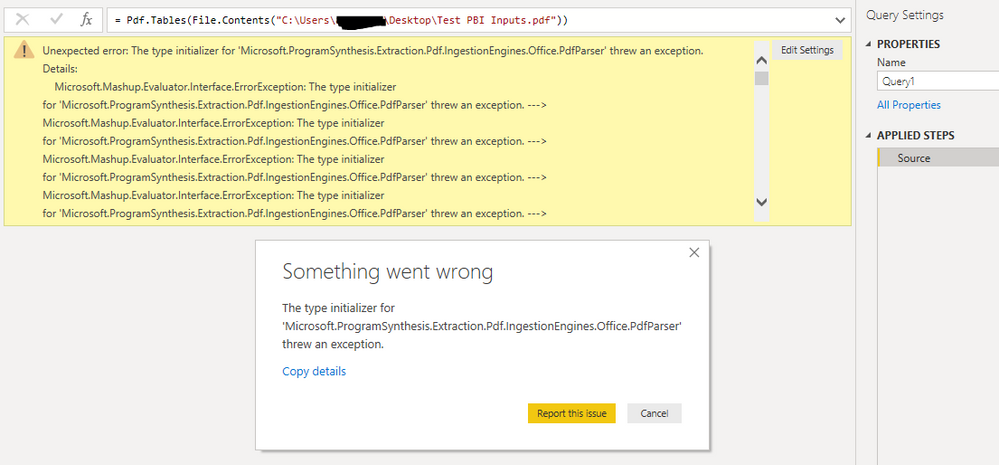
My first time trying to import PDF data into PQ and I am getting this error. 


error1.PNG


The error I get:


ExceptionResultMessage:
The type initializer for 'Microsoft.ProgramSynthesis.Extraction.Pdf.IngestionEngines.Office.PdfParser' threw an exception.


Tried googling this error but haven't found anything useful. Any ideas?

1 ACCEPTED SOLUTION

Hi @Doodle ,


Could you please check if this dll file exist in your installation folder of Power BI Desktop? The Default location should be "C:\Program Files\Microsoft Power BI Desktop\bin"


3.jpg


If it is missing it your Power BI, Please try to reinstall the December version or upgrade to the February version of Power BI Desktop.


Best regards,


Community Support Team _ Dong Li
If this post helps, then please consider Accept it as the solution to help the other members find it more quickly.

View solution in original post

4 REPLIES 4
v-lid-msft
Community Support
Community Support

Hi @Doodle ,


Sorry for that, but we cannot reproduce this issue on my side, could you please try to reproduce this on the latest version of Power BI Desktop? Can you see the content if you open this pdf file using edge?


8.jpg


Best regards,


Community Support Team _ Dong Li
If this post helps, then please consider Accept it as the solution to help the other members find it more quickly.

Hi,


Thanks for looking into this.


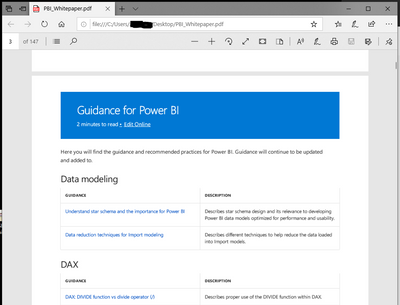
Opened the PDF in edge. 
edge.PNG


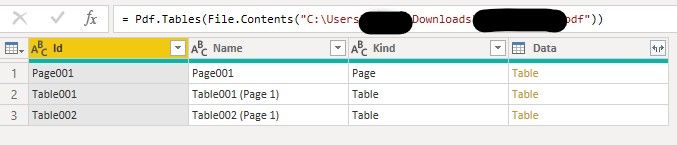
Confirmed using December version of Power BI.

dfg.PNG


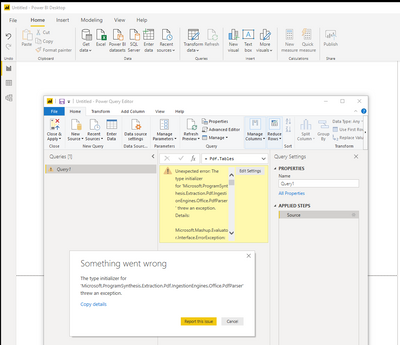
Tried to open the file in Power BI. Same error again.
error55.PNG

Here is the beginning portion of the error notes (can't post whole thing becoz of character limit):


Feedback Type:
Frown (Error)

Error Message:
Error

Stack Trace:
Microsoft.Mashup.Evaluator.Interface.ErrorException: The type initializer for 'Microsoft.ProgramSynthesis.Extraction.Pdf.IngestionEngines.Office.PdfParser' threw an exception. ---> Microsoft.Mashup.Evaluator.Interface.ErrorException: The type initializer for 'Microsoft.ProgramSynthesis.Extraction.Pdf.IngestionEngines.Office.PdfParser' threw an exception. ---> Microsoft.Mashup.Evaluator.Interface.ErrorException: The type initializer for 'Microsoft.ProgramSynthesis.Extraction.Pdf.IngestionEngines.Office.PdfParser' threw an exception. ---> Microsoft.Mashup.Evaluator.Interface.ErrorException: The type initializer for 'Microsoft.ProgramSynthesis.Extraction.Pdf.IngestionEngines.Office.PdfParser' threw an exception. ---> Microsoft.Mashup.Evaluator.Interface.ErrorException: The type initializer for 'Microsoft.ProgramSynthesis.Extraction.Pdf.IngestionEngines.Office.PdfParser' threw an exception. ---> System.TypeInitializationException: The type initializer for 'Microsoft.ProgramSynthesis.Extraction.Pdf.IngestionEngines.Office.PdfParser' threw an exception. ---> System.TypeInitializationException: The type initializer for 'Microsoft.ProgramSynthesis.Extraction.Pdf.IngestionEngines.Office.PdfParser' threw an exception. ---> System.DllNotFoundException: Unable to load DLL 'pdf2text.dll': The specified module could not be found. (Exception from HRESULT: 0x8007007E)
at Microsoft.ProgramSynthesis.Extraction.Pdf.IngestionEngines.Office.PdfParser.GetPdf2TextVersion()
at Microsoft.ProgramSynthesis.Extraction.Pdf.IngestionEngines.Office.PdfParser..cctor()
--- End of inner exception stack trace ---


Is the issue due to pdf2text.dll? What is that and how do I get it? Please advise. Thanks!


Hi @Doodle ,


Could you please check if this dll file exist in your installation folder of Power BI Desktop? The Default location should be "C:\Program Files\Microsoft Power BI Desktop\bin"


3.jpg


If it is missing it your Power BI, Please try to reinstall the December version or upgrade to the February version of Power BI Desktop.


Best regards,


Community Support Team _ Dong Li
If this post helps, then please consider Accept it as the solution to help the other members find it more quickly.

Hi Dong,


Yes it turns out the dll file was missing. It is strange that Power BI is installed on my machine the same way it is installed on my other colleagues machines and yet the file was only missing on my machine. 


To resolve the issue, I did not reinstall Power BI as suggested. Rather, i just had my collueage send me the dll file and once i put that in the bin folder, the importing of PDFs worked.

Helpful resources

Announcements
April Power BI Update Carousel

Power BI Monthly Update - April 2026

Check out the April 2026 Power BI update to learn about new features.

New to Fabric survey Carousel

New to Fabric Survey

If you have recently started exploring Fabric, we'd love to hear how it's going. Your feedback can help with product improvements.

Power BI DataViz World Championships carousel

Power BI DataViz World Championships - June 2026

A new Power BI DataViz World Championship is coming this June! Don't miss out on submitting your entry.

FabCon and SQLCon Highlights Carousel

FabCon &SQLCon Highlights

Experience the highlights from FabCon & SQLCon, available live and on-demand starting April 14th.