cancel
Showing results for 
Search instead for 
Did you mean: 

We've captured the moments from FabCon & SQLCon that everyone is talking about, and we are bringing them to the community, live and on-demand. Starts on April 14th. Register now

Reply
elionhoxha
New Member

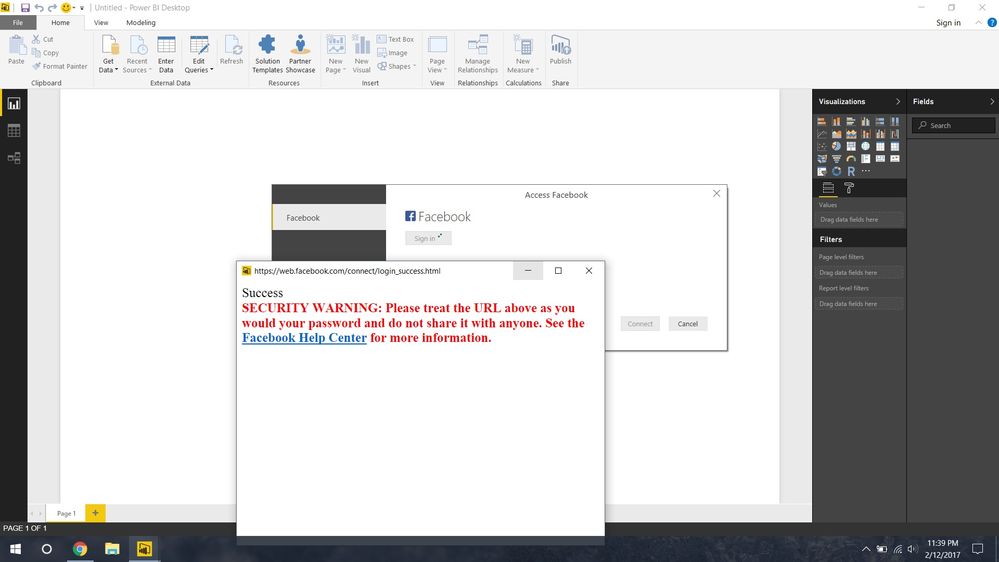
Error connecting to Facebook API.

Hi, I have followed every official tutorial out there. I get this error both in Excel and PowerBI. 


I choose my page, and content. I log into facebook and accept Microsoft PowerBI app to get my FB data, then this appears.


Please if you have a fix it would really help.


Thank you.


error fb.jpg

3 REPLIES 3
Anonymous
Not applicable

Hi @elionhoxha,

I connect to Facebook from Power BI Desktop following the instructions in  this tutorial and everything works well.

Based on my research, the above warning is related to security setting of your Facebook account,  I would recommend you click Facebook Help Center in the above warning to check more information and post the question in Facebook community to get dedicated support.

Thanks,
Lydia Zhang

I did that and it only returns 5 columns: message, created_time, id, object_link and story.


Is there any way to fix that or is it a issue with the Facebook API?

I've got the same error, and I don't know how to fix it.

Helpful resources

Announcements
New to Fabric survey Carousel

New to Fabric Survey

If you have recently started exploring Fabric, we'd love to hear how it's going. Your feedback can help with product improvements.

Power BI DataViz World Championships carousel

Power BI DataViz World Championships - June 2026

A new Power BI DataViz World Championship is coming this June! Don't miss out on submitting your entry.

Join our Fabric User Panel

Join our Fabric User Panel

Share feedback directly with Fabric product managers, participate in targeted research studies and influence the Fabric roadmap.

March Power BI Update Carousel

Power BI Community Update - March 2026

Check out the March 2026 Power BI update to learn about new features.