cancel
Showing results for 
Search instead for 
Did you mean: 

Join the FabCon + SQLCon recap series. Up next: Power BI, Real-Time Intelligence, IQ and AI, and Data Factory take center stage. All sessions are available on-demand after the live show. Register now

Reply
Anonymous
Not applicable

Error Table to list

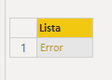
Hi guys I am getiing an error as the only element in my list. Everything goes right untill the last step when i change it to list

AlekseiNexa_0-1600094972232.png


let
Origen = Excel.Workbook(Web.Contents("https://.....xlsx"), null, true),
filtro_Sheet = Origen{[Item="cuenta",Kind="Sheet"]}[Data],
#"Encabezados promovidos" = Table.PromoteHeaders(filtro_Sheet, [PromoteAllScalars=true]),
#"Tipo cambiado" = Table.TransformColumnTypes(#"Encabezados promovidos",{{"cuenta", Int64.Type}}),
#"Duplicados quitados" = Table.Distinct(#"Tipo cambiado"),
Personalizado1 = Table.ToList(#"Duplicados quitados")
in
Personalizado1

1 ACCEPTED SOLUTION
Icey
Community Support
Community Support

Hi @Anonymous ,


Are the replies above helpful?


Best Regards,

Icey

View solution in original post

6 REPLIES 6
Icey
Community Support
Community Support

Hi @Anonymous ,


Are the replies above helpful?


Best Regards,

Icey

Anonymous
Not applicable

@Icey  Not that much. they were converting the number into text and I wanted to use th list as filter value and the column was numerical so what I did was to convert the other column to text so I can make the filter to work

Jimmy801
Community Champion
Community Champion

Hello @Anonymous 


change your last step to this

Table.ToList(#"Duplicados quitados",(x)=> Combiner.CombineTextByDelimiter(",")(List.Transform(x, each Text.From(_))))


If this post helps or solves your problem, please mark it as solution (to help other users find useful content and to acknowledge the work of users that helped you)
Kudoes are nice too

Have fun

Jimmy

lbendlin
Super User
Super User

When you click on the Error link it will add another step and tell you what went wrong.  after you corrected that you can then remove the added step.

Anonymous
Not applicable

@lbendlin it says that it can not convert the value to text. I though I could store numbers in lists.

So is that the issue?

I don't think lists accept any datatype other than variant.

Helpful resources

Announcements
April Power BI Update Carousel

Power BI Monthly Update - April 2026

Check out the April 2026 Power BI update to learn about new features.

New to Fabric survey Carousel

New to Fabric Survey

If you have recently started exploring Fabric, we'd love to hear how it's going. Your feedback can help with product improvements.

Power BI DataViz World Championships carousel

Power BI DataViz World Championships - June 2026

A new Power BI DataViz World Championship is coming this June! Don't miss out on submitting your entry.

FabCon and SQLCon Highlights Carousel

FabCon &SQLCon Highlights

Experience the highlights from FabCon & SQLCon, available live and on-demand starting April 14th.