Don't miss your chance to take the Fabric Data Engineer (DP-600) exam for FREE! Find out how by attending the DP-600 session on April 23rd (pacific time), live or on-demand.
Learn moreJoin the FabCon + SQLCon recap series. Up next: Power BI, Real-Time Intelligence, IQ and AI, and Data Factory take center stage. All sessions are available on-demand after the live show. Register now
So this is porbably a really silly question but I have looked and looked and I am not sure what I am doing wrong.
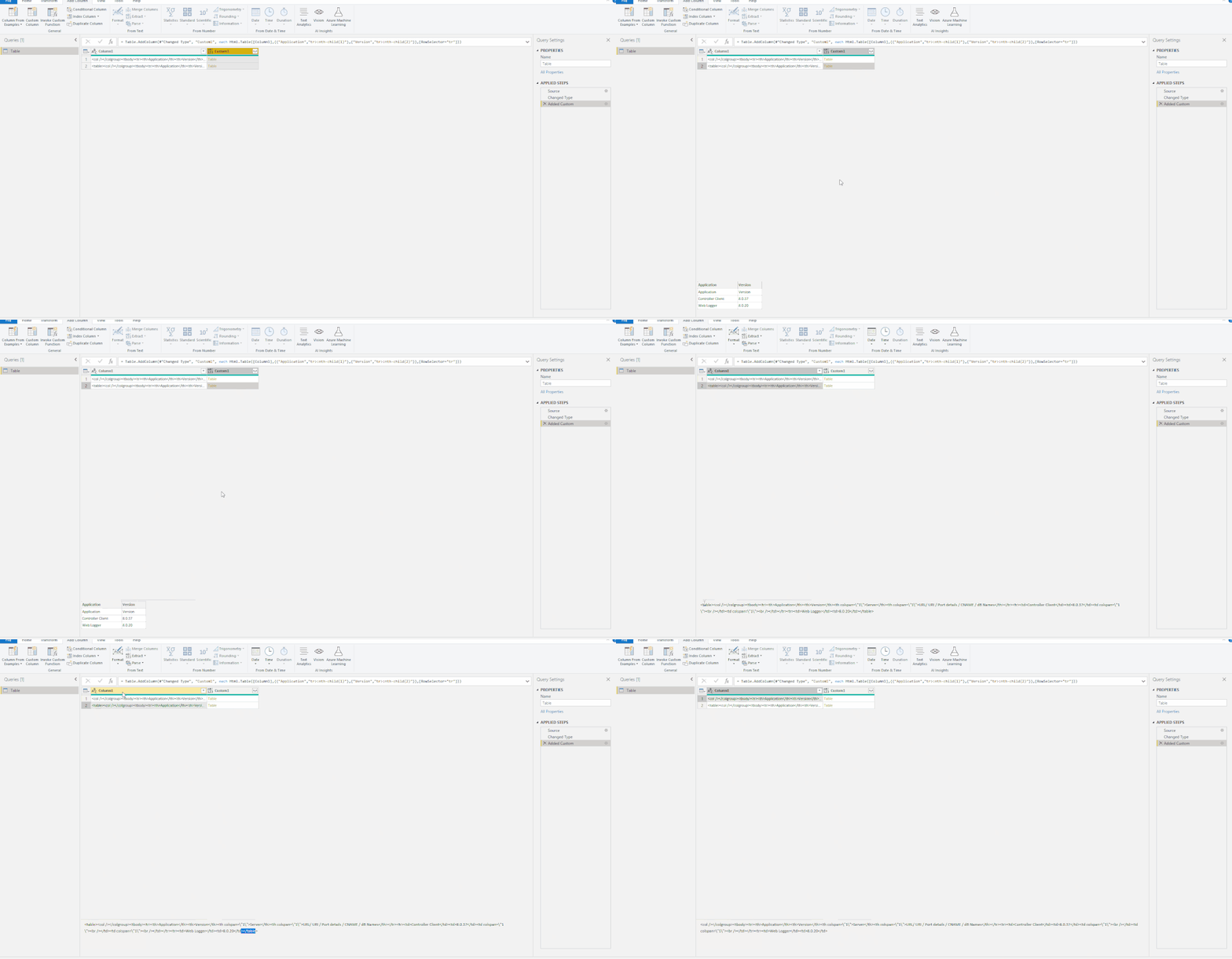
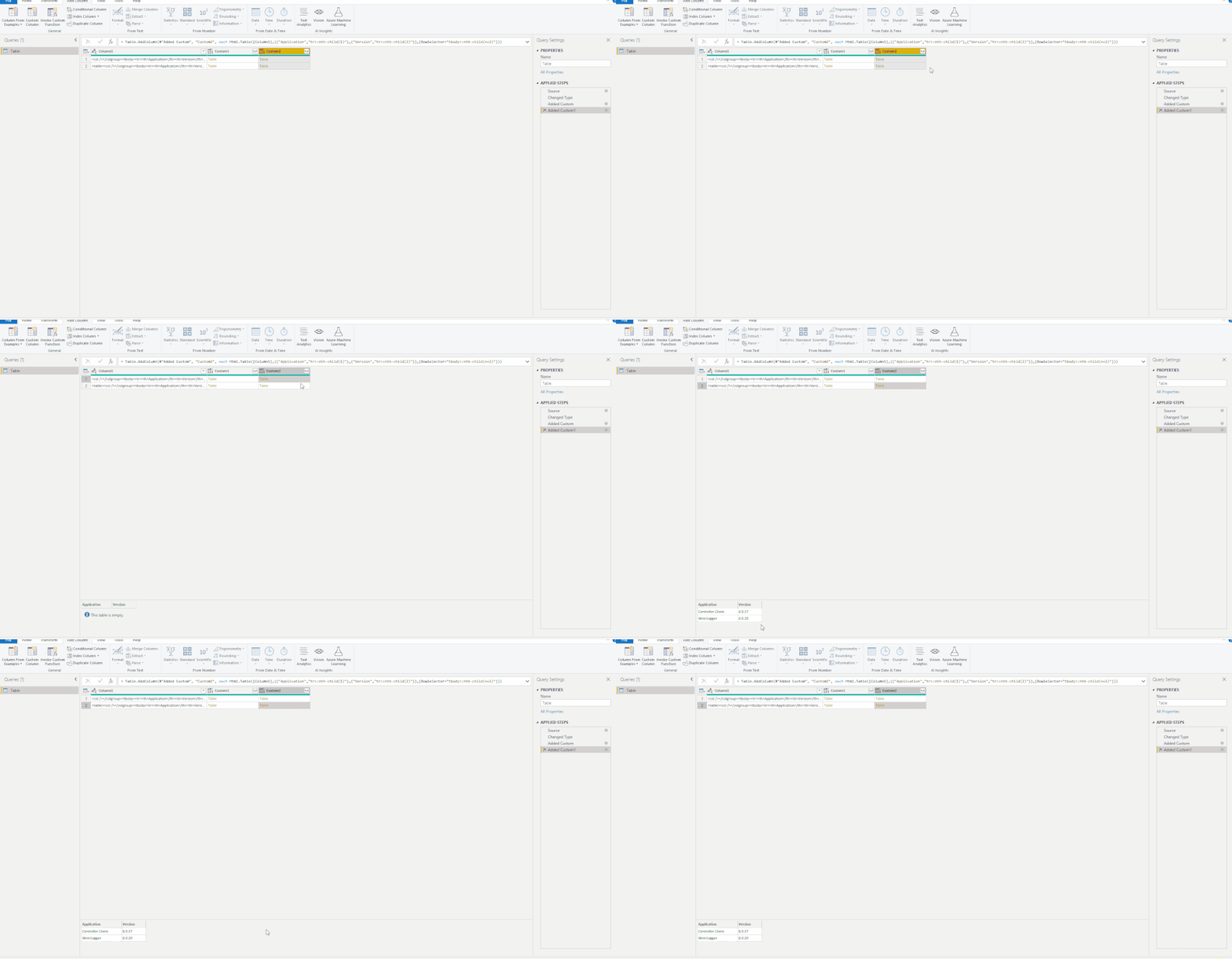
I have a column with stored htmlcode in it and I want to get the values out of the html tables in that code. An example is below is I am trying to return the columns "Application" and "Version" with the records ("Controller client", "8.0.37") and ("Web Logger","8.0.20") as two seperate rows in either 2 new columns in the same query or a completley different query.
<col /></colgroup><tbody><tr><th>Application</th><th>Version</th><th colspan=\"1\">Server</th><th colspan=\"1\">URL/ URI / Port details / CNAME / dB Names</th></tr><tr><td>Controller Client</td><td>8.0.37</td><td colspan=\"1\"><br /></td><td colspan=\"1\"><br /></td></tr><tr><td>Web Logger</td><td>8.0.20</td>
So I thought I could use the Html.Table function to do this with the following
let
Source = Html.Table("HTMLDetails,TestData",{"Application","App"},"<td>")
in
Source
However I am getting back We cannot convert the value "<td>" to type Record
Details:
Value=<td>
Type=[Type]
Any suggestions would be really appreciated please.
Solved! Go to Solution.
Hi @jsincontrol ,
Add <table> at the beginning of the code and </table> at the end.
<table><col /></colgroup><tbody><tr><th>Application</th><th>Version</th><th colspan=\"1\">Server</th><th colspan=\"1\">URL/ URI / Port details / CNAME / dB Names</th></tr><tr><td>Controller Client</td><td>8.0.37</td><td colspan=\"1\"><br /></td><td colspan=\"1\"><br /></td></tr><tr><td>Web Logger</td><td>8.0.20</td></table>
Then try to add a custom column like this:
= Html.Table([Column1],{{"Application","tr>:nth-child(1)"},{"Version","tr>:nth-child(2)"}},[RowSelector="tr"])
Or this:
= Html.Table([Column1],{{"Application","tr>:nth-child(1)"},{"Version","tr>:nth-child(2)"}},[RowSelector="tbody>:nth-child(n+2)"])
Best Regards,
Icey
If this post helps, then please consider Accept it as the solution to help the other members find it more quickly.
Hi @jsincontrol ,
Add <table> at the beginning of the code and </table> at the end.
<table><col /></colgroup><tbody><tr><th>Application</th><th>Version</th><th colspan=\"1\">Server</th><th colspan=\"1\">URL/ URI / Port details / CNAME / dB Names</th></tr><tr><td>Controller Client</td><td>8.0.37</td><td colspan=\"1\"><br /></td><td colspan=\"1\"><br /></td></tr><tr><td>Web Logger</td><td>8.0.20</td></table>
Then try to add a custom column like this:
= Html.Table([Column1],{{"Application","tr>:nth-child(1)"},{"Version","tr>:nth-child(2)"}},[RowSelector="tr"])
Or this:
= Html.Table([Column1],{{"Application","tr>:nth-child(1)"},{"Version","tr>:nth-child(2)"}},[RowSelector="tbody>:nth-child(n+2)"])
Best Regards,
Icey
If this post helps, then please consider Accept it as the solution to help the other members find it more quickly.
That saved my day ! But how did you find out about this syntax ?
Icey, thanks so much for a solution. Sorry I didn't reply sooner but just tested now. That is perfection 🙂
Who told you to use "<td>" ? That's not how Html.Table needs to be called.
Check out the April 2026 Power BI update to learn about new features.
If you have recently started exploring Fabric, we'd love to hear how it's going. Your feedback can help with product improvements.
A new Power BI DataViz World Championship is coming this June! Don't miss out on submitting your entry.
| User | Count |
|---|---|
| 5 | |
| 3 | |
| 3 | |
| 3 | |
| 2 |
| User | Count |
|---|---|
| 7 | |
| 5 | |
| 5 | |
| 5 | |
| 4 |