cancel
Showing results for 
Search instead for 
Did you mean: 

The Power BI Data Visualization World Championships is back! Get ahead of the game and start preparing now! Learn more

Reply
ZachUnger
Helper II
Helper II

EXCEL to DAX Query

Hi Team 


I'm struggling to convert the below from excel to DAX, hoping someone can help. 


1. =IF([@Date]="", "No Date Entered", IF([@Date]>DATE(2022,6,30),TEXT([@Date], "mmmmmmmmmm"), "Prior to FY 2022-23"))


2. =IF(ISNUMBER(SEARCH("Farm", [@[Detailed Description]])), "Farming","NA")


3. =IF(ISERROR([@[Detailed Description]]), "Error", "No")


Cheers 
Zach

1 ACCEPTED SOLUTION
v-yanjiang-msft
Community Support
Community Support

Hi @ZachUnger ,

According to your description, here's my solution.

1.

Column =
IF (
    [@Date] = BLANK (),
    "No Date Entered",
    IF (
        [@Date] > DATE ( 2022, 6, 30 ),
        FORMAT ( [@Date], "MMMM" ),
        "Prior to FY 2022-23"
    )
)

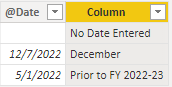
 Result:
vkalyjmsft_0-1670380433533.png

2.

Column =
IF ( CONTAINSSTRING ( [Detailed Description], "Farm" ), "Farming", "NA" )

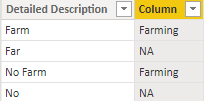
Result:
vkalyjmsft_1-1670380963605.png

3.Because after load table to Power BI Desktop, errors will become blank. If you want to distinguish error values, do it in Power Query, add a custom column.

let 
change=try [Detailed Description] otherwise "Error"
in
if change="Error" then "Error" else "No"

Result:

vkalyjmsft_2-1670381861274.png

I attach my sample below for your reference.


Best Regards,
Community Support Team _ kalyj

If this post helps, then please consider Accept it as the solution to help the other members find it more quickly.

View solution in original post

3 REPLIES 3
v-yanjiang-msft
Community Support
Community Support

Hi @ZachUnger ,

According to your description, here's my solution.

1.

Column =
IF (
    [@Date] = BLANK (),
    "No Date Entered",
    IF (
        [@Date] > DATE ( 2022, 6, 30 ),
        FORMAT ( [@Date], "MMMM" ),
        "Prior to FY 2022-23"
    )
)

 Result:

vkalyjmsft_0-1670380433533.png

2.

Column =
IF ( CONTAINSSTRING ( [Detailed Description], "Farm" ), "Farming", "NA" )

Result:

vkalyjmsft_1-1670380963605.png

3.Because after load table to Power BI Desktop, errors will become blank. If you want to distinguish error values, do it in Power Query, add a custom column.

let 
change=try [Detailed Description] otherwise "Error"
in
if change="Error" then "Error" else "No"

Result:

vkalyjmsft_2-1670381861274.png

I attach my sample below for your reference.


Best Regards,
Community Support Team _ kalyj

If this post helps, then please consider Accept it as the solution to help the other members find it more quickly.

Thank you, makes sense now 🙂 very much appreciated. 

Hi @ZachUnger ,

It's my pleasure! If you don't have other problems, would you mind accept the helpful replies as solutions? Then we are able to close the thread. More people who have the same requirment will find the solution quickly and benefit here, thank you!


Best Regards,
Community Support Team _ kalyj

Helpful resources

Announcements
Power BI DataViz World Championships

Power BI Dataviz World Championships

The Power BI Data Visualization World Championships is back! Get ahead of the game and start preparing now!

December 2025 Power BI Update Carousel

Power BI Monthly Update - December 2025

Check out the December 2025 Power BI Holiday Recap!

FabCon Atlanta 2026 carousel

FabCon Atlanta 2026

Join us at FabCon Atlanta, March 16-20, for the ultimate Fabric, Power BI, AI and SQL community-led event. Save $200 with code FABCOMM.