cancel
Showing results for 
Search instead for 
Did you mean: 

Data Days is here! Join us now for 60+ days of learning, challenges, and connection. Learn more

Reply
MCstudio
Helper I
Helper I

Dynamically updated data in Query does not visualize on dashboard / report

Hi community!

I have got such a problem.

I am using DirectQuery to connect to the DWH. Every day I need to have the information about yesterday. So, that fact table have a filter, which keep the rows only with the yesterday date. I decided not to use the yesterday date formula exactly in the fact table query. I create a Blank Query with the following formula:
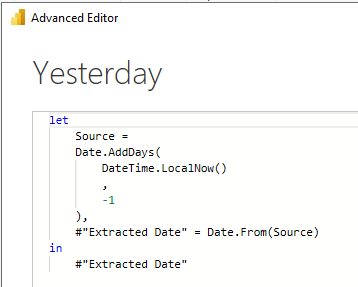
Capture3.PNG


And after that, I put @Yesterday into the fact table filter:
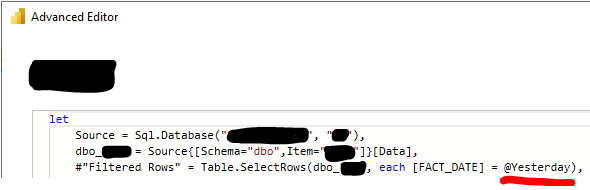
Capture5.PNG


All is fine, all is working and in the queries, and in the dashboard panel.

The report isn't published yet and it is on Power BI Desktop construction step.

Next day I opened the report, but the visualization(datas and the date card), after autoupdating, didn't update. I saw the information not for yesterday but for day before yesterday.

I went to the queries and saw, that the fact table FACT_DATE column had the yesterday date, so it is correct.

I went back to the report and made refresh manually, but it didn't change anything.

In the queries I noticed, that Yesterday query has question mark on it:
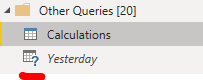
Capture.PNG


Normally, it must have this shape, and after only click on it, the icon changed.
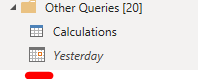
Capture2.PNG


But even that didn't help.


The report update and display right visualisation only after:

  • I close and open the report 4-5 times, or
  • I manually change something minor in the Yesterday query, or the fact table: for example in the Yesterday query after -1 add -0.

Have you got any solution?

Thank you in advance!

3 REPLIES 3
v-yanjiang-msft
Community Support
Community Support

Hi @MCstudio ,

The question mark before the table means that query isn't currently evaluated(loaded). I suggest you don't create a seperate yesterday query, directly add the code in the main table like this:

let
   Source= Sql.Database(....),
   dbo_=Source(....)[Data],
   #"Filtered Rows"= let yesterday=Date.from(Date.AddDays(DateTime.LocalNow(),-1))
   in Table.SelectRows(dbo_,each[FACT_DATE]=yesterday),
   .
   .
   .
in
   ...


Best Regards,
Community Support Team _ kalyj

If this post helps, then please consider Accept it as the solution to help the other members find it more quickly.

Hi @v-yanjiang-msft .

I tried your suggestion, but it didn't work. As before, the date and the other data are updating only in the Power Query table, but not on the dashboard.

Thank you for your answer. As I remember, I tried that metode too and it didn't work. But I am not sure, so I will try it, may be a second time 😁 I'll edit the code, on monday, at work and will check the result on tuesday. I'll let you know about results.

Helpful resources

Announcements
Fabric Data Days is here Carousel

Fabric Data Days 2026

Don't miss out on Data Days, June 15 through August 7. Learn Fabric, Power BI, SQL, AI and more.

May Power BI Update Carousel

Power BI Monthly Update - May 2026

Check out the May 2026 Power BI update to learn about new features.

Power BI DataViz World Championships carousel

Power BI DataViz World Championships - June 2026

A new Power BI DataViz World Championship is coming this June! Don't miss out on submitting your entry.