cancel
Showing results for 
Search instead for 
Did you mean: 

The Power BI Data Visualization World Championships is back! Get ahead of the game and start preparing now! Learn more

Reply
Anuj6
Frequent Visitor

Dynamically pass query in POST API BODY

Hello All,


I am trying to connect to an internal application using REST API POST method, for this i have created one Custom Connector.

When i am passing static query ( Select * from Table ) into API Body , i am able to connect to the application, i want this to happen dynamically.

I have tried using below code 


TEST_API = (url as text, Q as text) =>
let
body =
"{""queryConfigurationDto"": {

""configurationName"":""TEST App"",
""applicationId"":""ART_4ba6cf1d-f1ac-4efd-a58e-4c7806fe531d"",
""configAdgroups"":[""ALL_ACCESS""],
""readAdgroups"":[""ALL_ACCESS""],
""decryptionAccessAdGroups"":[],
""configurationType"":""QUERY"",
""dataSourceConfigurationId"":""ART_df2c0680-c816-435f-dscedd-e2acc74379f2""
""query"":"& Q &",#(lf)
""mandatoryParams"":[],
""encryptedParams"":[],
""paramValues"":{}},
""dataAccessRequest"":{""parameters"":{},""responseFormat"":""KOSHER""}}",


i want this select query to be dynamic , is it possible?


Thanks

Anuj 


4 REPLIES 4
v-lid-msft
Community Support
Community Support

Hi @Anuj6 ,


How about the result after you follow the suggestions mentioned in my original post?Could you please provide more details about it If it doesn't meet your requirement?


Best regards,


Community Support Team _ Dong Li
If this post helps, then please consider Accept it as the solution to help the other members find it more quickly.

Hi Dong_li,

No , it didnt work for me , i was trying to pass some of the Body parameters dynamically.

Though i achieved it using below code


GetTable1 = (url as text,DS_ID as text,tb_nm as text) =>

let

body =
"{""queryConfigurationDto"": {

""configurationName"":""TEST"",
""applicationId"":""ABT_4ba6bf1d-f1ac-4efd-a58e-4c79234dse"",
""configAdgroups"":[""ALL_ACCESS""],
""readAdgroups"":[""ALL_ACCESS""],
""decryptionAccessAdGroups"":[],
""configurationType"":""QUERY"",
""dataSourceConfigurationId"":"""& DS_ID &""",
""query"":""select * from "& tb_nm &" LIMIT 1000"",
""mandatoryParams"":[],
""encryptedParams"":[],
""paramValues"":{}},
""dataAccessRequest"":{""parameters"":{},""responseFormat"":"" ""}}",


Thanks!

Anuj 

Hi Team,


Apologies for delay in response, i was on leave so couldnt try out the solution you provided.

Will do it and provide you the feedback soon.


Thanks!

Anuj 

v-lid-msft
Community Support
Community Support

Hi @Anuj6 ,


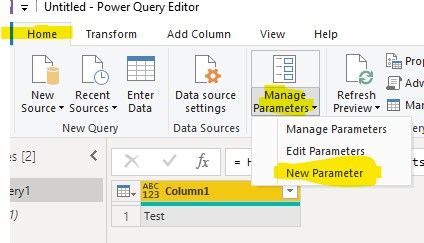
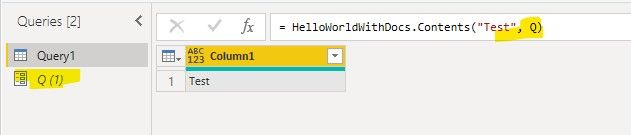
We can create a parameter and use it to call your customer connector, if you want to change the parameter, you can use Update Parameters In Group or Update Parameters for reports published into the Service or update the parameter in Desktop


7.jpg8.jpg9.jpg


Best regards,


Community Support Team _ Dong Li
If this post helps, then please consider Accept it as the solution to help the other members find it more quickly.

Helpful resources

Announcements
Power BI DataViz World Championships

Power BI Dataviz World Championships

The Power BI Data Visualization World Championships is back! Get ahead of the game and start preparing now!

December 2025 Power BI Update Carousel

Power BI Monthly Update - December 2025

Check out the December 2025 Power BI Holiday Recap!

FabCon Atlanta 2026 carousel

FabCon Atlanta 2026

Join us at FabCon Atlanta, March 16-20, for the ultimate Fabric, Power BI, AI and SQL community-led event. Save $200 with code FABCOMM.

Top Solution Authors