Get certified for free when you join Fabric Data Days 2026 and dive into Fabric, Power BI, SQL, AI, and other essential data skills.
Join nowTry your skills in the Power BI Dataviz World Championship! Round one ends June 26. Join now
Hello All,
I am trying to connect to an internal application using REST API POST method, for this i have created one Custom Connector.
When i am passing static query ( Select * from Table ) into API Body , i am able to connect to the application, i want this to happen dynamically.
I have tried using below code
TEST_API = (url as text, Q as text) =>
let
body =
"{""queryConfigurationDto"": {
""configurationName"":""TEST App"",
""applicationId"":""ART_4ba6cf1d-f1ac-4efd-a58e-4c7806fe531d"",
""configAdgroups"":[""ALL_ACCESS""],
""readAdgroups"":[""ALL_ACCESS""],
""decryptionAccessAdGroups"":[],
""configurationType"":""QUERY"",
""dataSourceConfigurationId"":""ART_df2c0680-c816-435f-dscedd-e2acc74379f2""
""query"":"& Q &",#(lf)
""mandatoryParams"":[],
""encryptedParams"":[],
""paramValues"":{}},
""dataAccessRequest"":{""parameters"":{},""responseFormat"":""KOSHER""}}",
i want this select query to be dynamic , is it possible?
Thanks
Anuj
Hi @Anuj6 ,
How about the result after you follow the suggestions mentioned in my original post?Could you please provide more details about it If it doesn't meet your requirement?
Best regards,
Hi Dong_li,
No , it didnt work for me , i was trying to pass some of the Body parameters dynamically.
Though i achieved it using below code
GetTable1 = (url as text,DS_ID as text,tb_nm as text) =>
let
body =
"{""queryConfigurationDto"": {
""configurationName"":""TEST"",
""applicationId"":""ABT_4ba6bf1d-f1ac-4efd-a58e-4c79234dse"",
""configAdgroups"":[""ALL_ACCESS""],
""readAdgroups"":[""ALL_ACCESS""],
""decryptionAccessAdGroups"":[],
""configurationType"":""QUERY"",
""dataSourceConfigurationId"":"""& DS_ID &""",
""query"":""select * from "& tb_nm &" LIMIT 1000"",
""mandatoryParams"":[],
""encryptedParams"":[],
""paramValues"":{}},
""dataAccessRequest"":{""parameters"":{},""responseFormat"":"" ""}}",
Thanks!
Anuj
Hi Team,
Apologies for delay in response, i was on leave so couldnt try out the solution you provided.
Will do it and provide you the feedback soon.
Thanks!
Anuj
Hi @Anuj6 ,
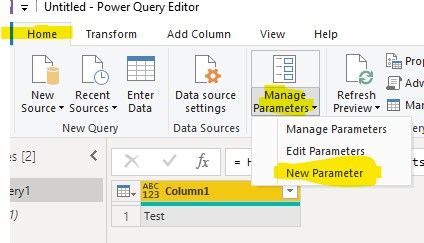
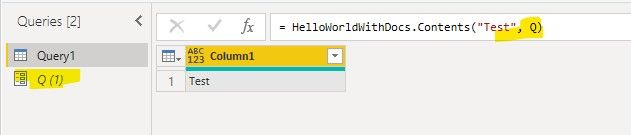
We can create a parameter and use it to call your customer connector, if you want to change the parameter, you can use Update Parameters In Group or Update Parameters for reports published into the Service or update the parameter in Desktop
Best regards,
Don't miss out on Data Days, June 15 through August 7. Learn Fabric, Power BI, SQL, AI and more.
Check out the May 2026 Power BI update to learn about new features.
| User | Count |
|---|---|
| 4 | |
| 4 | |
| 2 | |
| 2 | |
| 1 |