cancel
Showing results for 
Search instead for 
Did you mean: 

July 7 - July 17 | Round 2 of the Power BI Dataviz World Championships. Don't miss your chance! Learn more

Reply
jaryszek
Super User
Super User

Dynamically concatenate columns from table

Hello,


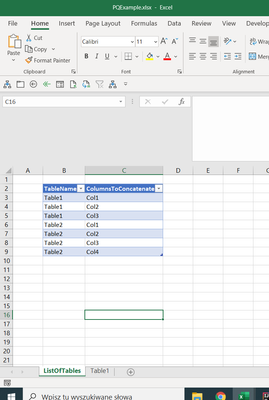
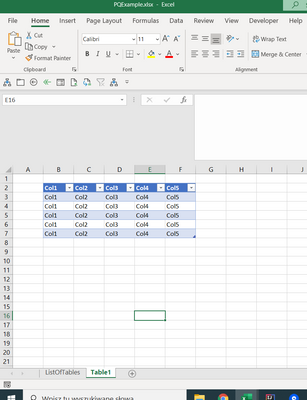
i have table in Excel like here:

jaryszek_0-1614592326736.png


and second table is :

jaryszek_1-1614592346908.png


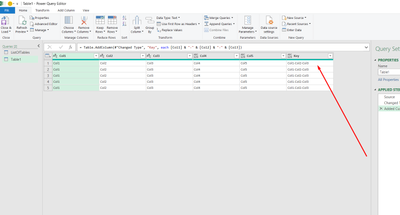
ListOfTables - there is a list for each table which columns i want to concatenate automatically in order to get Added column with result (for Table1): "Col1-Col2-Col3". 


jaryszek_2-1614592461713.png

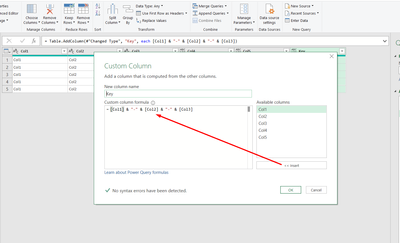
Now to create custom column i have to manually input formula :


jaryszek_3-1614592489240.png


How can i do this automatically? From list? 

Please help,
Jacek


2 ACCEPTED SOLUTIONS
Anonymous
Not applicable

Hi @jaryszek 


The column content or the column name you want to concat?


Vera_33_0-1614655041953.png


Text.Combine( List.Difference(Record.ToList(#"Added Index"{[Index]}),{[Index]}),"-"))


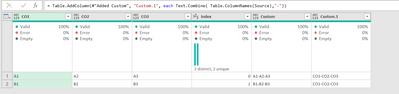
Vera_33_1-1614655096880.png

Text.Combine( Table.ColumnNames(Source),"-"))

View solution in original post

v-alq-msft
Community Support
Community Support

Hi, @jaryszek 


Based on your description, I created data to reproduce your scenario. The pbix file is attached in the end.

Table1:

b1.png


Table2:

b2.png


You may apply the following steps 'Grouped Rows', 'Expanded Columns', 'Changed Type1' steps. Here are the m codes in 'Advanced Editor' for 'Table2'.

let
    Source = Table.FromRows(Json.Document(Binary.Decompress(Binary.FromText("i45WCklMykk1VNJRcs7PMVSK1UEVMcIQMUaIGGHoMsLQZYRLl4lSbCwA", BinaryEncoding.Base64), Compression.Deflate)), let _t = ((type nullable text) meta [Serialized.Text = true]) in type table [TableName = _t, ColumnsToConcatenate = _t]),
    #"Changed Type" = Table.TransformColumnTypes(Source,{{"TableName", type text}, {"ColumnsToConcatenate", type text}}),
    #"Grouped Rows" = Table.Group(#"Changed Type", {"TableName"}, {{"Columns", each 
Table.AddColumn(
    Table.SelectColumns( Table1,[ColumnsToConcatenate]),
    "New",
    (x)=>Text.Combine(Record.ToList(x),"-")
)
    
     }}),
    #"Expanded Columns" = Table.ExpandTableColumn(#"Grouped Rows", "Columns", {"Col1", "Col2", "Col3", "Col4", "New"}, {"Col1", "Col2", "Col3", "Col4", "New"}),
    #"Changed Type1" = Table.TransformColumnTypes(#"Expanded Columns",{{"Col1", type text}, {"Col2", type text}, {"Col3", type text}, {"Col4", type text}, {"New", type text}})
in
    #"Changed Type1"


Result:

b3.png


Best Regards

Allan


If this post helps, then please consider Accept it as the solution to help the other members find it more quickly.

View solution in original post

3 REPLIES 3
jaryszek
Super User
Super User

Thank you Guys! 

This is awesome.
Jacek

v-alq-msft
Community Support
Community Support

Hi, @jaryszek 


Based on your description, I created data to reproduce your scenario. The pbix file is attached in the end.

Table1:

b1.png


Table2:

b2.png


You may apply the following steps 'Grouped Rows', 'Expanded Columns', 'Changed Type1' steps. Here are the m codes in 'Advanced Editor' for 'Table2'.

let
    Source = Table.FromRows(Json.Document(Binary.Decompress(Binary.FromText("i45WCklMykk1VNJRcs7PMVSK1UEVMcIQMUaIGGHoMsLQZYRLl4lSbCwA", BinaryEncoding.Base64), Compression.Deflate)), let _t = ((type nullable text) meta [Serialized.Text = true]) in type table [TableName = _t, ColumnsToConcatenate = _t]),
    #"Changed Type" = Table.TransformColumnTypes(Source,{{"TableName", type text}, {"ColumnsToConcatenate", type text}}),
    #"Grouped Rows" = Table.Group(#"Changed Type", {"TableName"}, {{"Columns", each 
Table.AddColumn(
    Table.SelectColumns( Table1,[ColumnsToConcatenate]),
    "New",
    (x)=>Text.Combine(Record.ToList(x),"-")
)
    
     }}),
    #"Expanded Columns" = Table.ExpandTableColumn(#"Grouped Rows", "Columns", {"Col1", "Col2", "Col3", "Col4", "New"}, {"Col1", "Col2", "Col3", "Col4", "New"}),
    #"Changed Type1" = Table.TransformColumnTypes(#"Expanded Columns",{{"Col1", type text}, {"Col2", type text}, {"Col3", type text}, {"Col4", type text}, {"New", type text}})
in
    #"Changed Type1"


Result:

b3.png


Best Regards

Allan


If this post helps, then please consider Accept it as the solution to help the other members find it more quickly.
Anonymous
Not applicable

Hi @jaryszek 


The column content or the column name you want to concat?


Vera_33_0-1614655041953.png


Text.Combine( List.Difference(Record.ToList(#"Added Index"{[Index]}),{[Index]}),"-"))


Vera_33_1-1614655096880.png

Text.Combine( Table.ColumnNames(Source),"-"))

Helpful resources

Announcements
Fabric Data Days is here Carousel

Data Days 2026

Don't miss out on Data Days, June 15 through August 7. Learn Fabric, Power BI, SQL, AI and more.

Power BI DataViz World Championships carousel

Power BI DataViz World Championships - June 2026

A new Power BI DataViz World Championship is coming this June! Don't miss out on submitting your entry.