

Don't miss your chance to take exam DP-600 or DP-700 on us!
Request nowLearn from the best! Meet the four finalists headed to the FINALS of the Power BI Dataviz World Championships! Register now
I have added Pivot steps in my table and this made my months column (Jan to Jun) appear. The next step am the below query to replace column values using
Table.ReplaceValue(#"Pivoted Column",null,0,Replacer.ReplaceValue,{"JAN", "FEB", "MAR", "APR", "MAY", "JUN", "JUL", "AUG", "SEP", "OCT", "NOV", "DEC"})
The problem here is since I dont have no data from Jul to Dec, the query fails to execute. How do I dynamically make the list of month's appear in the above formula ?
Solved! Go to Solution.
Hi @smathew8,
change your pivot function that it pivots not only distict values in your table but more - see screenshot.
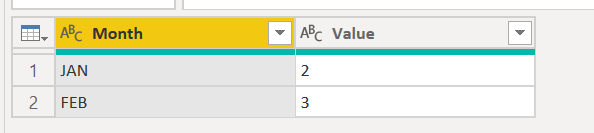
Sample data:
Your pivot looks similar to mine, right? The List.Distinct ... gives you distict values of the column Month. But you want more.
Therefore you define all the 12 months by yourself. There will be nulls for all months where no values exist.
Hi @smathew8,
change your pivot function that it pivots not only distict values in your table but more - see screenshot.
Sample data:
Your pivot looks similar to mine, right? The List.Distinct ... gives you distict values of the column Month. But you want more.
Therefore you define all the 12 months by yourself. There will be nulls for all months where no values exist.
Share feedback directly with Fabric product managers, participate in targeted research studies and influence the Fabric roadmap.
Check out the February 2026 Power BI update to learn about new features.