cancel
Showing results for 
Search instead for 
Did you mean: 

The Power BI Data Visualization World Championships is back! Get ahead of the game and start preparing now! Learn more

Reply
drewswiney
Regular Visitor

Dynamically Reference Calculated Row Above

Hello. I am looking to create column D of the table below in power query. You can see the excel formula to the right. I need to add columns from the current row and add a previously calculated row above.  I am stuck and do not know how to proceed. Any help would be appreciated.


 ABCD 
 DateProductionDemandFinal InventoryFormula in Column D
15/1/2021    80,287    96,419            158,276N/A
26/1/2021    77,325    86,650            148,951B3-C3+D2
37/1/2021    83,763    83,179            149,535B4-C4+D3
48/1/2021    81,890    74,075            157,350B5-C5+D4
1 ACCEPTED SOLUTION
Vera_33
Resident Rockstar
Resident Rockstar

Hi @drewswiney 


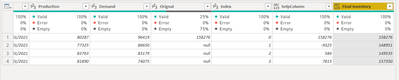
Add a helpColumn and an Index column

Vera_33_0-1622705591223.png

let
    Source = Table.FromRows(Json.Document(Binary.Decompress(Binary.FromText("bY7JDYAwDARbQXmvhO3gI7Wg9EYtVEYAKZza1zxm7HlOpCPxKCSckNZl3xAECb+4GCYund8bWAPilipaz749d2TRW99gSo1Pw38+yHDLD2Yv3YgfgxGFbjcnkOth1A0=", BinaryEncoding.Base64), Compression.Deflate)), let _t = ((type nullable text) meta [Serialized.Text = true]) in type table [Date = _t, Production = _t, Demand = _t, Orignal = _t]),
    #"Changed Type" = Table.TransformColumnTypes(Source,{{"Date", type date}, {"Production", Int64.Type}, {"Demand", Int64.Type}, {"Orignal", Int64.Type}}),
    #"Added Index" = Table.AddIndexColumn(#"Changed Type", "Index", 0, 1, Int64.Type),
    #"Added Custom" = Table.AddColumn(#"Added Index", "helpColumn", each if [Index]=0 then [Orignal] 
else [Production]- [Demand]),
    #"Added Custom1" = Table.AddColumn(#"Added Custom", "Final Inventory", each List.Sum(List.FirstN(#"Added Custom"[helpColumn],[Index]+1)))
in
    #"Added Custom1"


View solution in original post

2 REPLIES 2
Vera_33
Resident Rockstar
Resident Rockstar

Hi @drewswiney 


Add a helpColumn and an Index column

Vera_33_0-1622705591223.png

let
    Source = Table.FromRows(Json.Document(Binary.Decompress(Binary.FromText("bY7JDYAwDARbQXmvhO3gI7Wg9EYtVEYAKZza1zxm7HlOpCPxKCSckNZl3xAECb+4GCYund8bWAPilipaz749d2TRW99gSo1Pw38+yHDLD2Yv3YgfgxGFbjcnkOth1A0=", BinaryEncoding.Base64), Compression.Deflate)), let _t = ((type nullable text) meta [Serialized.Text = true]) in type table [Date = _t, Production = _t, Demand = _t, Orignal = _t]),
    #"Changed Type" = Table.TransformColumnTypes(Source,{{"Date", type date}, {"Production", Int64.Type}, {"Demand", Int64.Type}, {"Orignal", Int64.Type}}),
    #"Added Index" = Table.AddIndexColumn(#"Changed Type", "Index", 0, 1, Int64.Type),
    #"Added Custom" = Table.AddColumn(#"Added Index", "helpColumn", each if [Index]=0 then [Orignal] 
else [Production]- [Demand]),
    #"Added Custom1" = Table.AddColumn(#"Added Custom", "Final Inventory", each List.Sum(List.FirstN(#"Added Custom"[helpColumn],[Index]+1)))
in
    #"Added Custom1"


mahoneypat
Microsoft Employee
Microsoft Employee

This calculation should probably be done on the DAX side with a measure or a column, but here is an example of how to do it in the query editor.  To see how it works, just create a blank query, open the Advanced Editor and replace the text there with the M code below.


let
    Source = Table.FromRows(Json.Document(Binary.Decompress(Binary.FromText("fY/JDcMwDARbMfhewKQkXrUI6i21pLI4fthOBAj7ms9gtnfSXfbCRQj0fn23BaOE35yGJnnx/zbRQHGjgU422dxRiz7sBlNe2FogVU6bz20VbvWHxVdtLaFVT1vMNkEkP1ob2HX19DhzxI/xAQ==", BinaryEncoding.Base64), Compression.Deflate)), let _t = ((type nullable text) meta [Serialized.Text = true]) in type table [Date = _t, Production = _t, Demand = _t, #"Final Inventory" = _t]),
    #"Changed Type" = Table.TransformColumnTypes(Source,{{"Date", type date}, {"Production", Int64.Type}, {"Demand", Int64.Type}, {"Final Inventory", Int64.Type}}),
    #"Added Index" = Table.AddIndexColumn(#"Changed Type", "Index", 0, 1, Int64.Type),
    #"Added Custom" = Table.AddColumn(#"Added Index", "Custom", each if [Index] = 0 then null else [Production] - [Demand] + #"Changed Type"{[Index]-1}[Final Inventory], type number)
in
    #"Added Custom"


Pat


Did I answer your question? Mark my post as a solution! Kudos are also appreciated!

To learn more about Power BI, follow me on Twitter or subscribe on YouTube.


@mahoneypa HoosierBI on YouTube


Helpful resources

Announcements
Power BI DataViz World Championships

Power BI Dataviz World Championships

The Power BI Data Visualization World Championships is back! Get ahead of the game and start preparing now!

December 2025 Power BI Update Carousel

Power BI Monthly Update - December 2025

Check out the December 2025 Power BI Holiday Recap!

FabCon Atlanta 2026 carousel

FabCon Atlanta 2026

Join us at FabCon Atlanta, March 16-20, for the ultimate Fabric, Power BI, AI and SQL community-led event. Save $200 with code FABCOMM.