This is best Fabric, Power BI, SQL and AI community event. How do we know? The last event sold out! Save €200 with code FABCMTY200.
Register nowA new Data Days event is coming soon! This time we’re going bigger than ever. Fabric, Power BI, SQL, AI and more. Don't miss out.
Hey everybody,
I´m currently working on a custom connector for a api. The conector is already set up to deliver all the data in one big table but then I discovered navigation tables so I guess I have to start all over again 😊
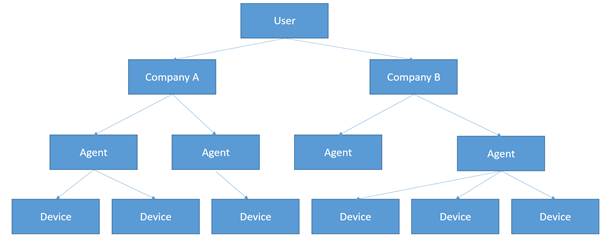
So the concept is the following. I have one user who owns 0…n company’s which all own 0…n agents which all own 0…n devices. And each device can own 0…n Tags.
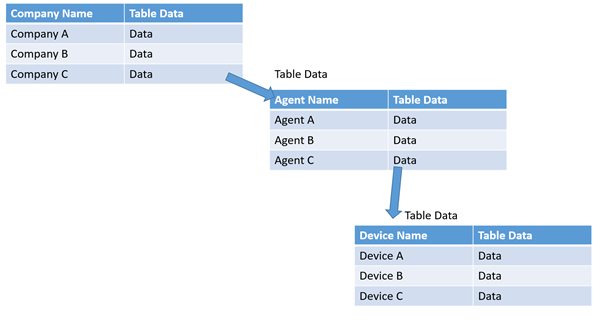
So what I would want to build is an output of nested tables which looks like this:
As mentioned the data is now being delivered in one big table. But I thing getting it in a table to drill through it would be was cooler 😊
Sadly I have no idea to get this as dynamic as I want. From my understanding of other programming languages I would do some for loops but I haven’t really figured out how to do that in m.
Any tipps how to start this right?
Thanks in advance!
Regards,
Luis
Solved! Go to Solution.
Hi @luisat ,
I think your question may be more suitable for the Developers forum: https://community.powerbi.com/t5/Developer/bd-p/Developer
As to M, I think there may be several ways to achieve what you want. The below code does literally what you want - a set of nested tables, but I am not sure about practicality in application to connectors:
let
Source = Table.FromRows(Json.Document(Binary.Decompress(Binary.FromText("i45WMlTSQcGJSrE6qKJGQJyEIgoSMQbiZAxREyBOgYvC1JkCcSqGqBkQp6GIgnSbA3E6hqgFEGcoxcYCAA==", BinaryEncoding.Base64), Compression.Deflate)), let _t = ((type text) meta [Serialized.Text = true]) in type table [User = _t, #"Company Name" = _t, #"Agent Name" = _t, #"Device Name" = _t, Data = _t]),
#"Changed Type" = Table.TransformColumnTypes(Source,{{"User", type text}, {"Company Name", type text}, {"Agent Name", type text}, {"Device Name", type text}, {"Data", type text}}),
#"Pack Data" = Table.Group(#"Changed Type", {"User", "Company Name", "Agent Name", "Device Name"}, {{"Data", each _}}),
#"Pack Devices" = Table.Group(#"Pack Data", {"User", "Company Name", "Agent Name"}, {{"Data", each _}}),
#"Pack Agents" = Table.Group(#"Pack Devices", {"User", "Company Name"}, {{"Data", each _}}),
#"Pack Companies" = Table.Group(#"Pack Agents", {"User"}, {{"Data", each _}})
in
#"Pack Companies"
This can be further improved by adding table types in the grouping and maybe creating a function to loop through the column to remove some duplicated code, but in principle, this does what you need (as far as I understand it).
Kind regards,
JB
Hi @luisat ,
I think your question may be more suitable for the Developers forum: https://community.powerbi.com/t5/Developer/bd-p/Developer
As to M, I think there may be several ways to achieve what you want. The below code does literally what you want - a set of nested tables, but I am not sure about practicality in application to connectors:
let
Source = Table.FromRows(Json.Document(Binary.Decompress(Binary.FromText("i45WMlTSQcGJSrE6qKJGQJyEIgoSMQbiZAxREyBOgYvC1JkCcSqGqBkQp6GIgnSbA3E6hqgFEGcoxcYCAA==", BinaryEncoding.Base64), Compression.Deflate)), let _t = ((type text) meta [Serialized.Text = true]) in type table [User = _t, #"Company Name" = _t, #"Agent Name" = _t, #"Device Name" = _t, Data = _t]),
#"Changed Type" = Table.TransformColumnTypes(Source,{{"User", type text}, {"Company Name", type text}, {"Agent Name", type text}, {"Device Name", type text}, {"Data", type text}}),
#"Pack Data" = Table.Group(#"Changed Type", {"User", "Company Name", "Agent Name", "Device Name"}, {{"Data", each _}}),
#"Pack Devices" = Table.Group(#"Pack Data", {"User", "Company Name", "Agent Name"}, {{"Data", each _}}),
#"Pack Agents" = Table.Group(#"Pack Devices", {"User", "Company Name"}, {{"Data", each _}}),
#"Pack Companies" = Table.Group(#"Pack Agents", {"User"}, {{"Data", each _}})
in
#"Pack Companies"
This can be further improved by adding table types in the grouping and maybe creating a function to loop through the column to remove some duplicated code, but in principle, this does what you need (as far as I understand it).
Kind regards,
JB
hey @Anonymous ,
thank you for the perfect packing example!
This is exactly what i was looking for!
Regards,
Luis
Sign up to receive a private message when registration opens and key events begin.
If you have recently started exploring Fabric, we'd love to hear how it's going. Your feedback can help with product improvements.