Don't miss your chance to take the Fabric Data Engineer (DP-600) exam for FREE! Find out how by attending the DP-600 session on April 23rd (pacific time), live or on-demand.
Learn moreNext up in the FabCon + SQLCon recap series: The roadmap for Microsoft SQL and Maximizing Developer experiences in Fabric. All sessions are available on-demand after the live show. Register now
Hi,
I am trying to calcualte a dynamic Max value from one column in Power Query Editor.
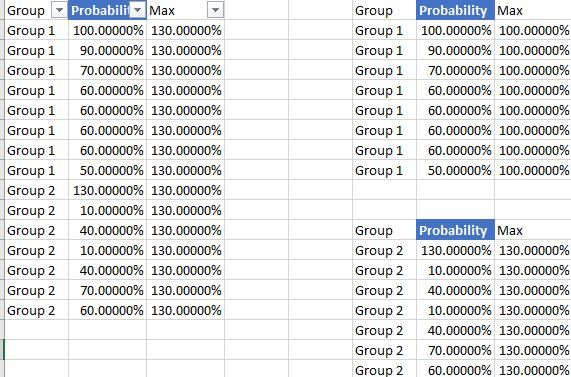
An example below where I have different groups, I would like to be able to have dynamic Max value measurement based on one selected group, but not only I would to be able to measure the Max among several number of groups and all the groups.
I am using the Max value for the following step in Power Query to define boundaries.
The final goal is to be able in Power Bi viewer to dynamically change these calculated boundaries based on the groups selected for a same visual.
Thanks for the help
Cheers
Hi @Farwest ,
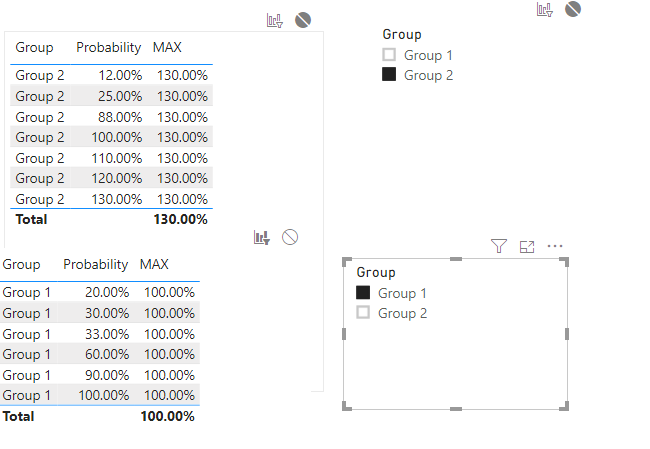
As @artemus said, we cannot achieve that by power query. We can create a meaure by DAX as below to work on it.
MAX = CALCULATE(MAX('Table'[Probability]),ALLSELECTED('Table'))
For more details, please check the pbix as attached.
Thank you for the answer,
I managed to get out of this problem.
I am still struggling with some other dynamic calculations.
I am trying to use a filter in order to set a measure, it is a single selection filter.
Selected = if(HASONEVALUE('Table['Name]);SELECTEDVALUE('Table[Name]);"ALL")
Dear Community,
I am still struggling with the filter selection,
I created a measure to get the selected value or get "ALL" instead
I'm not entirly sure what you are trying to accomplish, but...
1. If you have loaded all the data you need to calculate the values, you should be able to write a dax measure which does what you want. Chances are one of the quick measures that is offered will work.
2. If you are using direct query, and have not loaded the data needed to calculate the value, then you will probably need to wait until the filter on parameter is implemented in Power Bi. Doing this your self is possible, but quite difficult, and has many caveats.
If you have recently started exploring Fabric, we'd love to hear how it's going. Your feedback can help with product improvements.
A new Power BI DataViz World Championship is coming this June! Don't miss out on submitting your entry.
Share feedback directly with Fabric product managers, participate in targeted research studies and influence the Fabric roadmap.
| User | Count |
|---|---|
| 6 | |
| 3 | |
| 3 | |
| 3 | |
| 2 |