Join us at FabCon Atlanta from March 16 - 20, 2026, for the ultimate Fabric, Power BI, AI and SQL community-led event. Save $200 with code FABCOMM.
Register now!The Power BI Data Visualization World Championships is back! Get ahead of the game and start preparing now! Learn more
I have a table called "Cost" that has Items and Monthly Costs:
| Item | Cost Year | Jan_Cost | Feb_Cost | Mar_Cost | Apr_Cost | May_Cost |
| A | 2022 | 10 | 10 | 11 | 12 | 14 |
| B | 2022 | 14 | 15 | 15 | 16 | 17 |
| C | 2022 | 17 | 19 | 21 | 20 | 19 |
Currently I have a measure (There are a lot of these measures and I need them for every Product):
I have to change the measure to dynamically pick up the column, so that I only change one value every month and all my measures start picking up the required column like:
Var ColName = "Jan_Cost"
SumCost = sumx(filter(cost, Cost[Cost YEAR]=2022), Cost[ColName])
Any help will be appreciated.
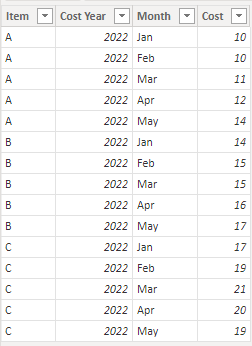
It's almost always a better option in these sorts of situations to unpivot your month columns so that your data looks like this instead:
Then SumCost is just SUM ( Cost[Cost] ).
The Power BI Data Visualization World Championships is back! Get ahead of the game and start preparing now!
| User | Count |
|---|---|
| 19 | |
| 10 | |
| 9 | |
| 8 | |
| 7 |