This time we’re going bigger than ever. Fabric, Power BI, SQL, AI and more. We're covering it all. You won't want to miss it.
Learn moreDid you hear? There's a new SQL AI Developer certification (DP-800). Start preparing now and be one of the first to get certified. Register now
I have a table called "Cost" that has Items and Monthly Costs:
| Item | Cost Year | Jan_Cost | Feb_Cost | Mar_Cost | Apr_Cost | May_Cost |
| A | 2022 | 10 | 10 | 11 | 12 | 14 |
| B | 2022 | 14 | 15 | 15 | 16 | 17 |
| C | 2022 | 17 | 19 | 21 | 20 | 19 |
Currently I have a measure (There are a lot of these measures and I need them for every Product):
I have to change the measure to dynamically pick up the column, so that I only change one value every month and all my measures start picking up the required column like:
Var ColName = "Jan_Cost"
SumCost = sumx(filter(cost, Cost[Cost YEAR]=2022), Cost[ColName])
Any help will be appreciated.
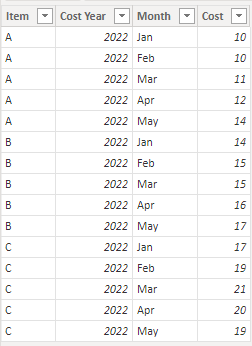
It's almost always a better option in these sorts of situations to unpivot your month columns so that your data looks like this instead:
Then SumCost is just SUM ( Cost[Cost] ).
Check out the April 2026 Power BI update to learn about new features.
If you have recently started exploring Fabric, we'd love to hear how it's going. Your feedback can help with product improvements.
A new Power BI DataViz World Championship is coming this June! Don't miss out on submitting your entry.