Join us at FabCon Atlanta from March 16 - 20, 2026, for the ultimate Fabric, Power BI, AI and SQL community-led event. Save $200 with code FABCOMM.
Register now!The Power BI Data Visualization World Championships is back! Get ahead of the game and start preparing now! Learn more
Hi,
I have a first query (API call: POST https://api.intercom.io/conversations) that return:
id_of_conversation - ....
Then I would like to do a second query: API call: POST https://api.intercom.io/conversations/{id_of_conversation}
How can I do to do a query that uses the list returned by the previous query?
I have created a list with all id_of_conversation. Then I tried to create a new source but it fails:
let
Source = Json.Document(Web.Contents("https://api.intercom.io/conversations/" & conv_id_param, [Headers=[Accept="application/json", Authorization="Bearer xxxxxxxxx="]]))
in
Source
I receive this error message: "Formula.Firewall: Query '22394727443' (step 'Source') references other queries or steps, so it may not directly access a data source. Please rebuild this data combination."
Thanks for your help
Best Regards,
Paul
Solved! Go to Solution.
Hi @Anonymous
It seems you want to return some rows/columns from API call: POST https://api.intercom.io/conversations,
This is filtered by selected id_of_conversation.
For example, there are many id_of_conversation(1,2,3) in the API call https://api.intercom.io/conversations,, but you want to return all rows where id_of_conversation=1.
or you want to return only one column "id_of_conversation".
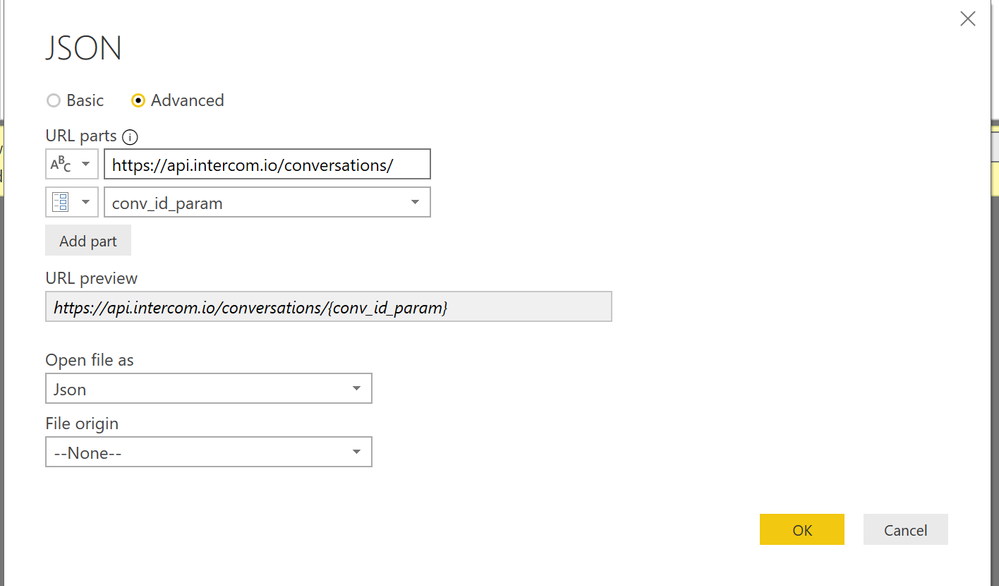
If so, you could create query parameter, then use it in connection string in Advanced editor.
Power BI Desktop Query Parameters, Part 1
Parameters for JSON API data - Maintain Query daily
Best Regards
Maggie
Community Support Team _ Maggie Li
If this post helps, then please consider Accept it as the solution to help the other members find it more quickly.
Hi @Anonymous
It seems you want to return some rows/columns from API call: POST https://api.intercom.io/conversations,
This is filtered by selected id_of_conversation.
For example, there are many id_of_conversation(1,2,3) in the API call https://api.intercom.io/conversations,, but you want to return all rows where id_of_conversation=1.
or you want to return only one column "id_of_conversation".
If so, you could create query parameter, then use it in connection string in Advanced editor.
Power BI Desktop Query Parameters, Part 1
Parameters for JSON API data - Maintain Query daily
Best Regards
Maggie
Community Support Team _ Maggie Li
If this post helps, then please consider Accept it as the solution to help the other members find it more quickly.
The Power BI Data Visualization World Championships is back! Get ahead of the game and start preparing now!
Check out the November 2025 Power BI update to learn about new features.
| User | Count |
|---|---|
| 10 | |
| 6 | |
| 5 | |
| 4 | |
| 2 |