Get certified for free when you join Fabric Data Days 2026 and dive into Fabric, Power BI, SQL, AI, and other essential data skills.
Join nowData Days is here! Join us now for 60+ days of learning, challenges, and connection. Learn more
Hello All -
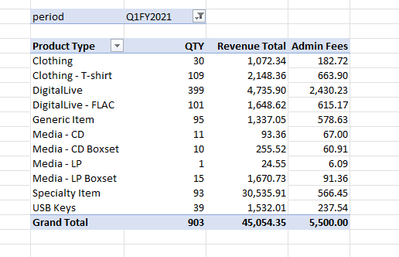
I need to allocate a set admin fee ($5500) per quarter across the rows in my pivot table (product categories) relative to the quantity of products sold. The pivot table is filtered by quarter (period). So, let's say for simplicity, 4 product categories this quarter, each with 100 products sold. The admin fee allocation would be $13.75 per product (400 products sold in that quarter * $13.75 = $5500). Previous quarter had 5 product categories, with various quantities sold. The admin fee is distributed proportionately across the product categories to still add up to $5500.
How could I translate this into a measure?
Thanks very much!
Solved! Go to Solution.
Try using an ALL() filter instead on your type column
Yup! Actually just figured that out as I received your reply! 🙂 Thanks very much. Works like a charm.
Please provide sanitized sample data that fully covers your issue. If you paste the data into a table in your post or use one of the file services it will be easier to assist you. I cannot use screenshots of your source data.
Please show the expected outcome based on the sample data you provided. Screenshots of the expected outcome are ok.
https://community.powerbi.com/t5/Desktop/How-to-Get-Your-Question-Answered-Quickly/m-p/1447523
Thanks. I realize this is a PowerBI forum, but was hoping that the solution would translate across to Excel. REMOVEFILTERS is not a valid function in Excel. Would you happen to know an equivalent way to do this so it works with my posted data sample?
Try using an ALL() filter instead on your type column
Yup! Actually just figured that out as I received your reply! 🙂 Thanks very much. Works like a charm.
Don't miss out on Data Days, June 15 through August 7. Learn Fabric, Power BI, SQL, AI and more.
Check out the May 2026 Power BI update to learn about new features.
| User | Count |
|---|---|
| 4 | |
| 4 | |
| 3 | |
| 2 | |
| 1 |
| User | Count |
|---|---|
| 11 | |
| 11 | |
| 5 | |
| 4 | |
| 3 |