We've captured the moments from FabCon & SQLCon that everyone is talking about, and we are bringing them to the community, live and on-demand. Starts on April 14th. Register now
Hey all,
I was testing out DirectQuery with a relatively complex query and was told that my query was slowing down the database at an alarming rate. This was even after I closed Power BI.
How do I kill the query attempt from Power BI while using DirectQuery if closing the application doesn't do it? Does the query have to be canceled on the database side?
Thanks.
Solved! Go to Solution.
Hi @wonga,
You are connecting to SQL Server database vis DirectQuery mode in Power BI Desktop, right?
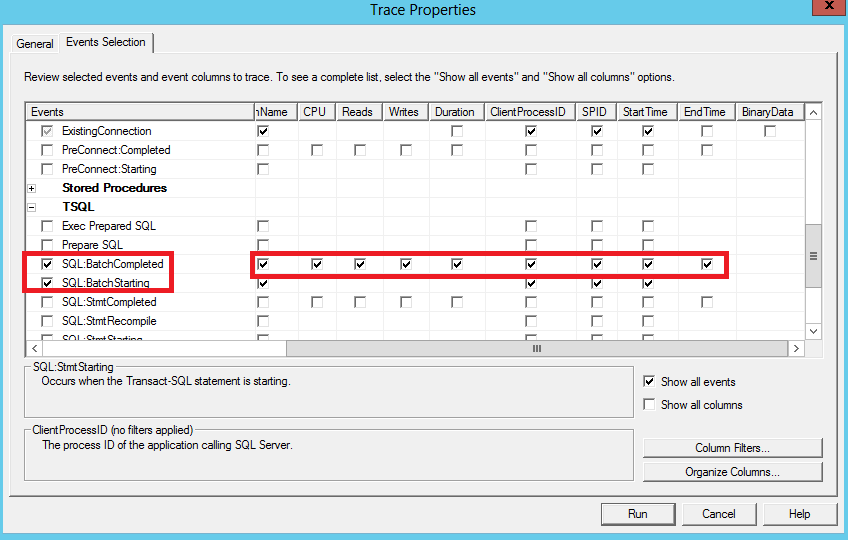
If that is the case, we are not able to kill the query attempt from Power BI Desktop and closing Desktop doesn’t complete this task. Yes, we would need to kill the query in SQL Server. You can use SQL Server Profiler to capture SPID of the query process, make sure you choose the following T-SQL event and columns when creating trace in Profiler.
Then execute the following T-SQL statement in SQL Server to kill the query. For more details about how to use KILL command in SQL Server, please review this article: https://msdn.microsoft.com/en-us/library/ms173730.aspx .
Kill {SPID value}
Thanks,
Lydia Zhang
Hi @wonga,
You are connecting to SQL Server database vis DirectQuery mode in Power BI Desktop, right?
If that is the case, we are not able to kill the query attempt from Power BI Desktop and closing Desktop doesn’t complete this task. Yes, we would need to kill the query in SQL Server. You can use SQL Server Profiler to capture SPID of the query process, make sure you choose the following T-SQL event and columns when creating trace in Profiler.
Then execute the following T-SQL statement in SQL Server to kill the query. For more details about how to use KILL command in SQL Server, please review this article: https://msdn.microsoft.com/en-us/library/ms173730.aspx .
Kill {SPID value}
Thanks,
Lydia Zhang
Thanks for the clarification @Anonymous.
If you have recently started exploring Fabric, we'd love to hear how it's going. Your feedback can help with product improvements.
A new Power BI DataViz World Championship is coming this June! Don't miss out on submitting your entry.
Share feedback directly with Fabric product managers, participate in targeted research studies and influence the Fabric roadmap.
| User | Count |
|---|---|
| 5 | |
| 3 | |
| 3 | |
| 2 | |
| 2 |
| User | Count |
|---|---|
| 11 | |
| 10 | |
| 7 | |
| 6 | |
| 5 |