I am working in Direct Query where I don't have access to the actual data due to SQL permission rights and the application I am pulling the data from won't allow any changes to the database. When I do the direct query I have a column of numbers that range from 400-850 and I want to group them together in certain ranges. I have tried creating a group but I am limited to either data ranges of 25 and I need them in groups that are not a set range. For instance anything less than 600 I need to be gouped together and then any number from 600-624 in another group and then 625-659, 660-699, 700-724,725-774,775+. I can group and put them in a BIN but I think there should be an easier way. I tried to transform the data by adding a Custom Column in the Transfrom data mode but I get a message when I use the IF or SWITCH commands that this is not supported in a Direct Query mode.
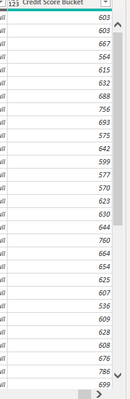
Here is a sample of my data:
Here is the attempt to add a Custom Calculated Column and the formula I used:
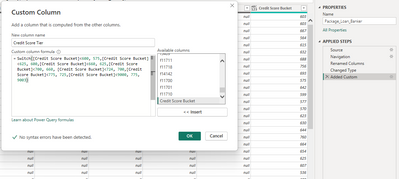
Here is the error message I get when I click OK as I think it should work as I do't have a syntax error so I know the formula is correct.

Any suggestions would be helpful. I tried writing the formula in SQL as well and that did not work as I tried it with a CASE WHEN statement. I tried looking up the PQL language and that was not helpful as I am unfamiliar with that language as well.
Should I try adding a column in the report itself instead of the actual table? Any suggestions would be helpful. I an a novice/moderate BI user trying to learn and expand my knowledge. Also I want to do this with several of the datasets in this query so if I can get this one which I think should be simple I can do it for the other columns I need to do it with. Thank you in advance.


