Get certified for free when you join Fabric Data Days 2026 and dive into Fabric, Power BI, SQL, AI, and other essential data skills.
Join nowJuly 28 - August 9 | Final Round of the Power BI Dataviz World Championships. This is your chance. Learn more
Hi,
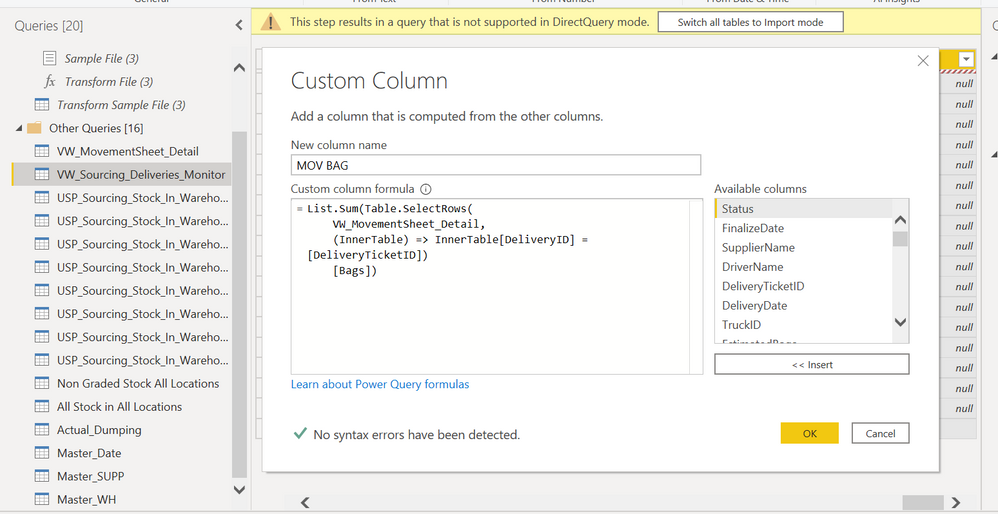
I need to sum data from another table in direct query mode. The operation is like SUMIFS in Excel, i need to sum column Bags in table VW_MovementSheet_Details with filter column DeliveryID in table VW_Sourcing_Deliveries_Monitor . I have tried some query that i found in youtube but thats only work in excel not in Power BI direct query.
Solved! Go to Solution.
Hi @Anonymous ,
If the tables are connected in Power BI using DirectQuery mode, creation of calculated columns is restricted. This is one of the limitations of DirectQuery mode in Power BI.
Rather than creating a caluclated column you will have to create a measure using DAX expression.
Thanks,
Pragati
Hi @Anonymous ,
If the tables are connected in Power BI using DirectQuery mode, creation of calculated columns is restricted. This is one of the limitations of DirectQuery mode in Power BI.
Rather than creating a caluclated column you will have to create a measure using DAX expression.
Thanks,
Pragati
Join us in Barcelona for FabCon and SQLCon, the Fabric, Power BI, SQL, and AI community event. Save €200 with code FABCMTY200.
If you love stickers, then you will definitely want to check out our community sticker challenge, Barcelona edition!
Check out the July 2026 Power BI update to learn about new features.