cancel
Showing results for 
Search instead for 
Did you mean: 

The Power BI Data Visualization World Championships is back! Get ahead of the game and start preparing now! Learn more

Reply
Caroline_1900
Frequent Visitor

Difference between two times

Hello Community,  Thanks for answering questions in here.  Your posts have helped me the past! 

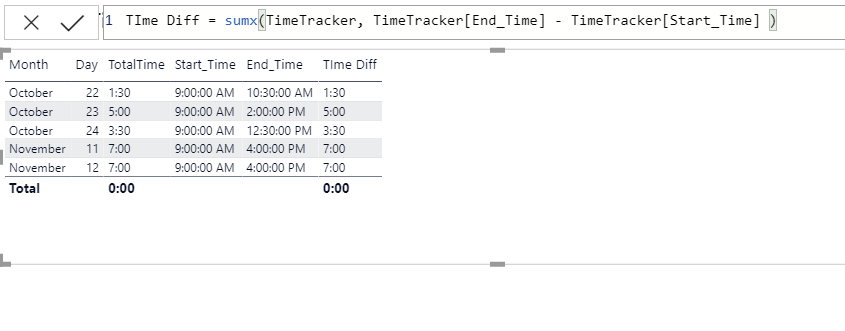
I want to calculate the difference between two times and then sum this info in a matrix.  I have used the forumla below

to calcute the difference between the End Time and the Start Time, but it won't sum correctly in a table/matrix.  See the images
below.
What am I missing?
Time Diff = sumx(TimeTracker, TimeTracker[End_Time] - TimeTracker[Start_Time] )
 
attached.Screenshot 2020-11-30 061627.pngScreenshot 2020-11-30 061321.png


2 ACCEPTED SOLUTIONS
AlB
Community Champion
Community Champion

Hi @Caroline_1900 

try this new measure that uses the one you already have

Time Diff TOT =
SUMX ( SUMMARIZE ( Table1, Table1[Col1], Table1[Col2] ), [Time Diff] )

Table1[Col1], Table1[Col2] are the fields you ave in rows and columns in your matrix visual. You'll probably want to convert te result to minutes; as type time it will roll over above 24 hours

Please mark the question solved when done and consider giving a thumbs up if posts are helpful.


Contact me privately for support with any larger-scale BI needs, tutoring, etc.


Cheers 


SU18_powerbi_badge

View solution in original post

AlB
Community Champion
Community Champion

@Caroline_1900 

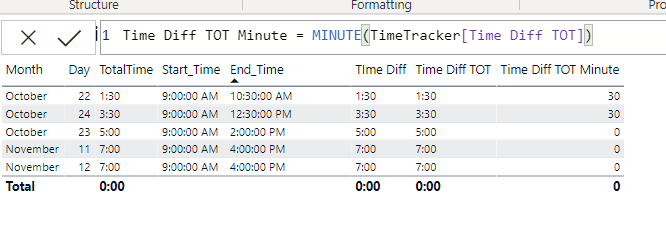
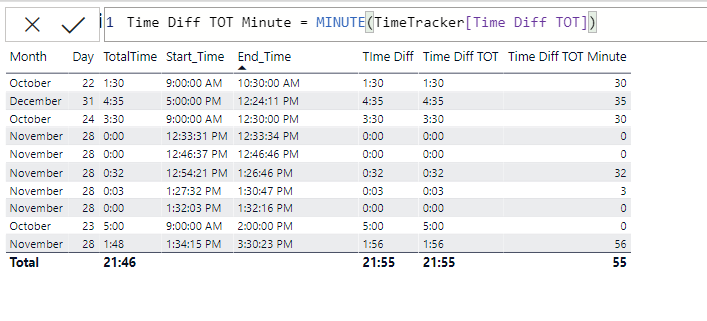
I do not understand what you are trying to show with the matrix visuals. What works? What doesn't?

When I talked about converting to minutes I wasn't referring to using MINUTE() but to multiplying the result by 24*60

Perhaps you can leave it as time if you know the total won¡t go above 24 hours


Please mark the question solved when done and consider giving a thumbs up if posts are helpful.

Contact me privately for support with any larger-scale BI needs, tutoring, etc.

Cheers 

SU18_powerbi_badge


View solution in original post

4 REPLIES 4
Caroline_1900
Frequent Visitor

The intent behind the data is to deterine the length of an event in minutes and hours.  I figured the best way to do this is calculated the difference between the beginning of an event and the end of the event.

I think the problem is with my data.  As noted above, if unfiltered, the table summed correctly.  And, upon experiment now, the table sums correctly on  a different filter selection.

Your solution was a good one.

Thank you very much for your help!

AlB
Community Champion
Community Champion

@Caroline_1900 

I do not understand what you are trying to show with the matrix visuals. What works? What doesn't?

When I talked about converting to minutes I wasn't referring to using MINUTE() but to multiplying the result by 24*60

Perhaps you can leave it as time if you know the total won¡t go above 24 hours


Please mark the question solved when done and consider giving a thumbs up if posts are helpful.

Contact me privately for support with any larger-scale BI needs, tutoring, etc.

Cheers 

SU18_powerbi_badge


Caroline_1900
Frequent Visitor

I am not sure that this helps.  See images.  I wonder if this is a filtering issue.  The table/matrix correctly sums, but does not if filtered.

Hmmm...Screenshot 2020-11-30 105927.pngScreenshot 2020-11-30 105846.png

AlB
Community Champion
Community Champion

Hi @Caroline_1900 

try this new measure that uses the one you already have

Time Diff TOT =
SUMX ( SUMMARIZE ( Table1, Table1[Col1], Table1[Col2] ), [Time Diff] )

Table1[Col1], Table1[Col2] are the fields you ave in rows and columns in your matrix visual. You'll probably want to convert te result to minutes; as type time it will roll over above 24 hours

Please mark the question solved when done and consider giving a thumbs up if posts are helpful.


Contact me privately for support with any larger-scale BI needs, tutoring, etc.


Cheers 


SU18_powerbi_badge

Helpful resources

Announcements
Power BI DataViz World Championships

Power BI Dataviz World Championships

The Power BI Data Visualization World Championships is back! Get ahead of the game and start preparing now!

December 2025 Power BI Update Carousel

Power BI Monthly Update - December 2025

Check out the December 2025 Power BI Holiday Recap!

FabCon Atlanta 2026 carousel

FabCon Atlanta 2026

Join us at FabCon Atlanta, March 16-20, for the ultimate Fabric, Power BI, AI and SQL community-led event. Save $200 with code FABCOMM.