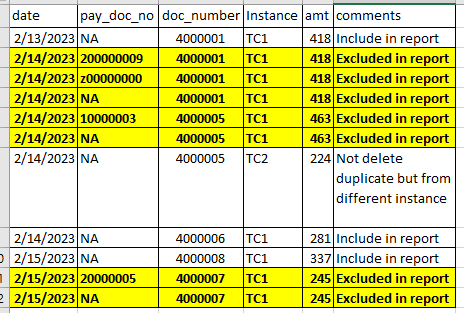
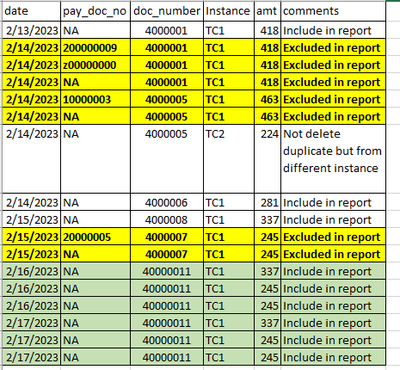
hi @shalinik ,
create a blank query. Copy and paste the below code into the advanced editor:
let
    Source = Table.FromRows(Json.Document(Binary.Decompress(Binary.FromText("ndG7CoMwFAbgVwmZBc1N7VikQ5dO3cTBmiMEbCw2QunTN+kl0nqhmOEny5f/hJPnmIaEhTSiDAf4sLXBI3eIvR0zl5ykNve6anoJuAiehH8IjV5nMyt3t2l5Xy0Xxpwj5F3GvBSDjNl/ZasJdRMQblO3BklowACS/aVRVWlAolNvUN21ZyRVXUMH2iClr6bU1eLjsZ+Hpi7V947EBEk9YSwZr1X8rlV4mQxlXIw/P1U2S4oH", BinaryEncoding.Base64), Compression.Deflate)), let _t = ((type nullable text) meta [Serialized.Text = true]) in type table [date = _t, pay_doc_no = _t, doc_number = _t, Instance = _t, amt = _t, comments = _t]),
    #"Changed Type" = Table.TransformColumnTypes(Source,{{"date", type date}, {"pay_doc_no", type text}, {"doc_number", Int64.Type}, {"Instance", type text}, {"amt", Int64.Type}, {"comments", type text}}),
    #"Inserted Merged Column" = Table.AddColumn(#"Changed Type", "UniqueValue", each Text.Combine({Text.From([doc_number], "en-CA"), Text.From([date], "en-CA"), [Instance]}, ""), type text),
    #"Grouped Rows" = Table.Group(#"Inserted Merged Column", {"UniqueValue"}, {{"Count", each _, type table [date=nullable date, pay_doc_no=nullable text, doc_number=nullable number, Instance=nullable text, amt=nullable number, comments=nullable text, Merged=text]}, {"RowCount", each Table.RowCount(_)= 1, Int64.Type}}),
    #"Filtered Rows" = Table.SelectRows(#"Grouped Rows", each ([RowCount] = true)),
    #"Removed Columns" = Table.RemoveColumns(#"Filtered Rows",{"UniqueValue", "RowCount"}),
    #"Expanded Count" = Table.ExpandTableColumn(#"Removed Columns", "Count", {"date", "pay_doc_no", "doc_number", "Instance", "amt", "comments"}, {"date", "pay_doc_no", "doc_number", "Instance", "amt", "comments"})
in
    #"Expanded Count"
Steps:
1. Merged columns date, instance and doc number
2. Grouped by this merged column, ("Count") a column with a table of all rows and another column ("RowCount") to count rows.
3. Filter the row count column for TRUE.
4. Removed all columns except "Count"
5. Expanded count.
Output;

file:
Delete rows based on conditions.pbix
Did I answer your question? Mark my post as a solution, this will help others!
If my response(s) assisted you in any way, don't forget to drop me a Kudos 🙂
Kind Regards,
Avinash