cancel
Showing results for 
Search instead for 
Did you mean: 

Vote for your favorite vizzies from the Power BI Dataviz World Championship submissions. Vote now!

Reply
Anonymous
Not applicable

Delete multiple rows based on values in 2 columns

Hi all,

I'm new to PowerBI and no experience of DAX (to speak of).
I need to reduce the nr of rows in a report, based on the values of 2 columns.
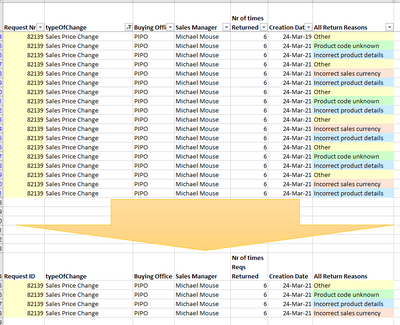
For the same Request Nr, i have multiple rows with the same value in the "All Return Reasons" column.

How do i write a code to only have 1 row for each of the values in the "All Return Reasons" column?

See below example.

Kitcat_NL_0-1634204840829.png

Thank you

1 ACCEPTED SOLUTION
BA_Pete
Super User
Super User

Hi @Anonymous ,


In Power Query, multi-select (Ctrl+click) your [Request ID] and [All Return Reasons] columns then, on the Home tab, go to Remove Rows > Remove Duplicates.


Pete


Now accepting Kudos! If my post helped you, why not give it a thumbs-up?

Proud to be a Datanaut!


View solution in original post

3 REPLIES 3
BA_Pete
Super User
Super User

Hi @Anonymous ,


In Power Query, multi-select (Ctrl+click) your [Request ID] and [All Return Reasons] columns then, on the Home tab, go to Remove Rows > Remove Duplicates.


Pete


Now accepting Kudos! If my post helped you, why not give it a thumbs-up?

Proud to be a Datanaut!


Anonymous
Not applicable

thanks @BA_Pete .
Does this also works for multiple Request Nrs with the same list of return reasons?
Thanks


By selecting the [Request Nr] column along with the [All Return Reasons] column, you're essentially creating an instruction that says:

"Remove any duplicated combinations (imagine concatenating these two fields then removing duplicates from the concatenated list) of [Request Nr] and [All Return Reasons]" so yes, this will work to remove duplicates within each [Request Nr] group separately.


If you only selected [All Return Reasons] before removing duplicates, it would just give you a unique list of this field, and would remove instances where the return reason was present again within a different Request Number.


Pete


Now accepting Kudos! If my post helped you, why not give it a thumbs-up?

Proud to be a Datanaut!


Helpful resources

Announcements
Power BI DataViz World Championships

Power BI Dataviz World Championships

Vote for your favorite vizzies from the Power BI World Championship submissions!

Sticker Challenge 2026 Carousel

Join our Community Sticker Challenge 2026

If you love stickers, then you will definitely want to check out our Community Sticker Challenge!

January Power BI Update Carousel

Power BI Monthly Update - January 2026

Check out the January 2026 Power BI update to learn about new features.

FabCon Atlanta 2026 carousel

FabCon Atlanta 2026

Join us at FabCon Atlanta, March 16-20, for the ultimate Fabric, Power BI, AI and SQL community-led event. Save $200 with code FABCOMM.