cancel
Showing results for 
Search instead for 
Did you mean: 

Data Days is here! Join us now for 60+ days of learning, challenges, and connection. Learn more

Reply
fairooset
Regular Visitor

Delete Row with condition

Hi,

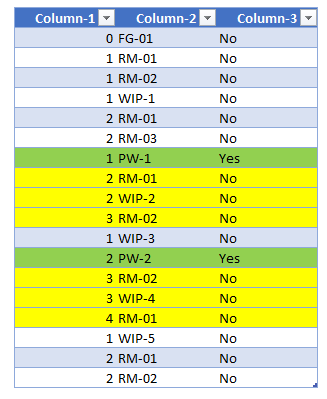
Here I have one table, my task is to delete yellow highlighted rows in below table. My condition is to delete each following rows after matches "Yes" in the Colum-3 till  column-1 value reach less than or equal to column-1 value of previous "Yes" row.


fairooset_1-1686145947433.png


1 ACCEPTED SOLUTION
Payeras_BI
Solution Sage
Solution Sage

Hi @fairooset,

Maybe it is not the most elegant way to solve it, but it seems to work.

From this:
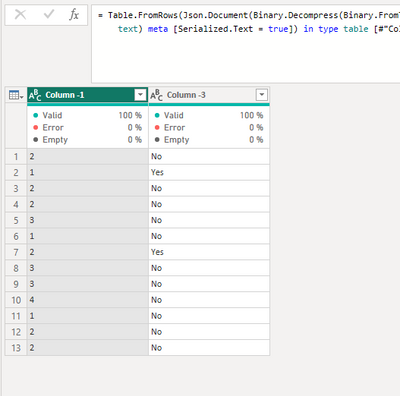
Payeras_BI_0-1686171537822.png

to this:

Payeras_BI_2-1686171568084.png

let
    Source = Table.FromRows(Json.Document(Binary.Decompress(Binary.FromText("i45WMlLSUfLLV4rViVYyBDIjU4vBbCRhJKYxqmIkBTB9xlgVm+DUh8aMBQA=", BinaryEncoding.Base64), Compression.Deflate)), let _t = ((type nullable text) meta [Serialized.Text = true]) in type table [#"Column -1" = _t, #"Column -3" = _t]),
    #"Changed Type" = Table.TransformColumnTypes(Source,{{"Column -1", Int64.Type}}),
    #"Added Index" = Table.AddIndexColumn(#"Changed Type", "Index", 0, 1, Int64.Type),
    #"Added Conditional Column" = Table.AddColumn(#"Added Index", "Custom", each if [#"Column -3"] = "Yes" then [Index] else null),
    #"Filled Down" = Table.FillDown(#"Added Conditional Column",{"Custom"}),
    #"Grouped Rows" = Table.Group(#"Filled Down", {"Custom"}, {{"All", each let Yes = try Table.SelectRows(_, each [#"Column -3"] = "Yes")[#"Column -1"]{0} otherwise Number.PositiveInfinity in Table.Combine({Table.SelectRows(_, each[#"Column -3"] = "Yes"), Table.RemoveFirstN(Table.SelectRows(_, each[#"Column -3"] <> "Yes"), each [#"Column -1"] > Yes)}), type table [#"Column -1"=nullable number, #"Column -3"=nullable text, Index=number, Custom=nullable number]}}),
    #"Removed Other Columns" = Table.SelectColumns(#"Grouped Rows",{"All"}),
    #"Expanded All" = Table.ExpandTableColumn(#"Removed Other Columns", "All", {"Column -1", "Column -3"}, {"Column -1", "Column -3"})
in
    #"Expanded All"

Regards,

If this post answered your question, please mark it as a solution to help other users find useful content.
Kudos are another nice way to acknowledge those who tried to help you.

J. Payeras
Mallorca, Spain

View solution in original post

1 REPLY 1
Payeras_BI
Solution Sage
Solution Sage

Hi @fairooset,

Maybe it is not the most elegant way to solve it, but it seems to work.

From this:

Payeras_BI_0-1686171537822.png

to this:

Payeras_BI_2-1686171568084.png

let
    Source = Table.FromRows(Json.Document(Binary.Decompress(Binary.FromText("i45WMlLSUfLLV4rViVYyBDIjU4vBbCRhJKYxqmIkBTB9xlgVm+DUh8aMBQA=", BinaryEncoding.Base64), Compression.Deflate)), let _t = ((type nullable text) meta [Serialized.Text = true]) in type table [#"Column -1" = _t, #"Column -3" = _t]),
    #"Changed Type" = Table.TransformColumnTypes(Source,{{"Column -1", Int64.Type}}),
    #"Added Index" = Table.AddIndexColumn(#"Changed Type", "Index", 0, 1, Int64.Type),
    #"Added Conditional Column" = Table.AddColumn(#"Added Index", "Custom", each if [#"Column -3"] = "Yes" then [Index] else null),
    #"Filled Down" = Table.FillDown(#"Added Conditional Column",{"Custom"}),
    #"Grouped Rows" = Table.Group(#"Filled Down", {"Custom"}, {{"All", each let Yes = try Table.SelectRows(_, each [#"Column -3"] = "Yes")[#"Column -1"]{0} otherwise Number.PositiveInfinity in Table.Combine({Table.SelectRows(_, each[#"Column -3"] = "Yes"), Table.RemoveFirstN(Table.SelectRows(_, each[#"Column -3"] <> "Yes"), each [#"Column -1"] > Yes)}), type table [#"Column -1"=nullable number, #"Column -3"=nullable text, Index=number, Custom=nullable number]}}),
    #"Removed Other Columns" = Table.SelectColumns(#"Grouped Rows",{"All"}),
    #"Expanded All" = Table.ExpandTableColumn(#"Removed Other Columns", "All", {"Column -1", "Column -3"}, {"Column -1", "Column -3"})
in
    #"Expanded All"

Regards,

If this post answered your question, please mark it as a solution to help other users find useful content.
Kudos are another nice way to acknowledge those who tried to help you.

J. Payeras
Mallorca, Spain
Helpful resources

Announcements
Fabric Data Days is here Carousel

Fabric Data Days 2026

Don't miss out on Data Days, June 15 through August 7. Learn Fabric, Power BI, SQL, AI and more.

May Power BI Update Carousel

Power BI Monthly Update - May 2026

Check out the May 2026 Power BI update to learn about new features.

Power BI DataViz World Championships carousel

Power BI DataViz World Championships - June 2026

A new Power BI DataViz World Championship is coming this June! Don't miss out on submitting your entry.