Join us at FabCon Atlanta from March 16 - 20, 2026, for the ultimate Fabric, Power BI, AI and SQL community-led event. Save $200 with code FABCOMM.
Register now!Learn from the best! Meet the four finalists headed to the FINALS of the Power BI Dataviz World Championships! Register now
Hi All,
I have a column where a value is fixed,i am using custom column for this,but its showing error.
Below is the Query where i am trying to make a validation in the column if it has the value Z then its valid else invalid.
if
List.Contains({"Z"})
then "Valid"
else "Invalid"
Thanks
Solved! Go to Solution.
This should be done with Text.Contains instead of List.Contains:
= Table.AddColumn(PriorTableOrStepName, "Validator", each if Text.Contains([Column1], "Z") then "Valid" else "Invalid", type text)
--Nate
This should be done with Text.Contains instead of List.Contains:
= Table.AddColumn(PriorTableOrStepName, "Validator", each if Text.Contains([Column1], "Z") then "Valid" else "Invalid", type text)
--Nate
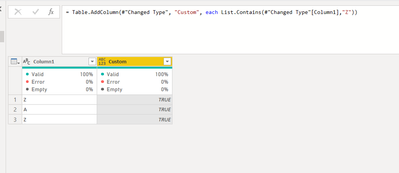
So you are trying to see this paticular column has at least 1 Z?
let
Source = Table.FromRows(Json.Document(Binary.Decompress(Binary.FromText("i45WilKK1YlWcgSTQHYsAA==", BinaryEncoding.Base64), Compression.Deflate)), let _t = ((type nullable text) meta [Serialized.Text = true]) in type table [Column1 = _t]),
#"Changed Type" = Table.TransformColumnTypes(Source,{{"Column1", type text}}),
#"Added Custom" = Table.AddColumn(#"Changed Type", "Custom", each List.Contains(#"Changed Type"[Column1],"Z"))
in
#"Added Custom"
Share feedback directly with Fabric product managers, participate in targeted research studies and influence the Fabric roadmap.
Check out the February 2026 Power BI update to learn about new features.