Join us at FabCon Atlanta from March 16 - 20, 2026, for the ultimate Fabric, Power BI, AI and SQL community-led event. Save $200 with code FABCOMM.
Register now!The Power BI Data Visualization World Championships is back! Get ahead of the game and start preparing now! Learn more
Hi All,
I have a column where a value is fixed,i am using custom column for this,but its showing error.
Below is the Query where i am trying to make a validation in the column if it has the value Z then its valid else invalid.
if
List.Contains({"Z"})
then "Valid"
else "Invalid"
Thanks
Solved! Go to Solution.
This should be done with Text.Contains instead of List.Contains:
= Table.AddColumn(PriorTableOrStepName, "Validator", each if Text.Contains([Column1], "Z") then "Valid" else "Invalid", type text)
--Nate
This should be done with Text.Contains instead of List.Contains:
= Table.AddColumn(PriorTableOrStepName, "Validator", each if Text.Contains([Column1], "Z") then "Valid" else "Invalid", type text)
--Nate
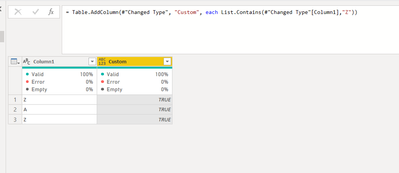
So you are trying to see this paticular column has at least 1 Z?
let
Source = Table.FromRows(Json.Document(Binary.Decompress(Binary.FromText("i45WilKK1YlWcgSTQHYsAA==", BinaryEncoding.Base64), Compression.Deflate)), let _t = ((type nullable text) meta [Serialized.Text = true]) in type table [Column1 = _t]),
#"Changed Type" = Table.TransformColumnTypes(Source,{{"Column1", type text}}),
#"Added Custom" = Table.AddColumn(#"Changed Type", "Custom", each List.Contains(#"Changed Type"[Column1],"Z"))
in
#"Added Custom"
The Power BI Data Visualization World Championships is back! Get ahead of the game and start preparing now!
| User | Count |
|---|---|
| 19 | |
| 10 | |
| 9 | |
| 7 | |
| 6 |