cancel
Showing results for 
Search instead for 
Did you mean: 

The Power BI Data Visualization World Championships is back! Get ahead of the game and start preparing now! Learn more

Reply
StrictlyNicola
New Member

Date column not found - rolling 52 weeks of data changes every week

Hi

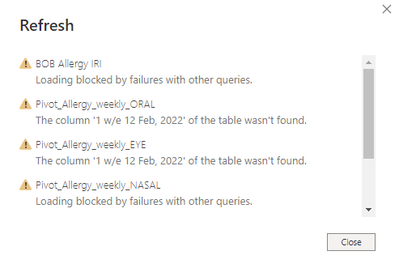
I use excel data with 52 weeks worth of data. The data periods change every week as the last week drops off and the new week adds on. I get an error message every week because power BI can't find the date that dropped off. Is there any way to prevent this happening?

StrictlyNicola_0-1677071699230.png


1 ACCEPTED SOLUTION
StrictlyNicola
New Member

Thank you @serpiva64 - I have had some help and think it is resolved by removing a step which was auto-created in my query. This seems to have fixed the problem!

View solution in original post

2 REPLIES 2
StrictlyNicola
New Member

Thank you @serpiva64 - I have had some help and think it is resolved by removing a step which was auto-created in my query. This seems to have fixed the problem!

serpiva64
Solution Sage
Solution Sage

Hi,

the problem is in your query. You hardcoded your data in the name of the column. You need to make it dynamic.

You can find many tutorial in Youtube. 

If you can post some sample data probably is possible to solve it.

Helpful resources

Announcements
Power BI DataViz World Championships

Power BI Dataviz World Championships

The Power BI Data Visualization World Championships is back! Get ahead of the game and start preparing now!

December 2025 Power BI Update Carousel

Power BI Monthly Update - December 2025

Check out the December 2025 Power BI Holiday Recap!

FabCon Atlanta 2026 carousel

FabCon Atlanta 2026

Join us at FabCon Atlanta, March 16-20, for the ultimate Fabric, Power BI, AI and SQL community-led event. Save $200 with code FABCOMM.

Users online (1,497)