Learn from the best! Meet the four finalists headed to the FINALS of the Power BI Dataviz World Championships! Register now
Hello all,
I connect Power BI desktop with excel data source which is placed on a SharePoint. When I upload the visualization on power BI app, the data does not automatically get refreshed when any changes are made to this excel.
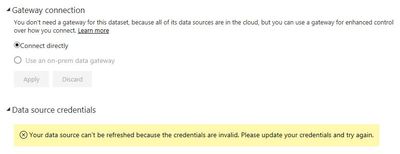
When I looked into the data gateway settings, it shows that this type of connection does not need any data gateway but gives me an error. See below screen-print. Am I missing anything? Any help will be appreciated.
Thanks,
Lakshay
Solved! Go to Solution.
Based on the error message there would be 2 things that need to be fixed:
Hello all,
I connect Power BI desktop with excel data source which is placed on a SharePoint. When I upload the visualization on power BI app, the data does not automatically get refreshed when any changes are made to this excel.
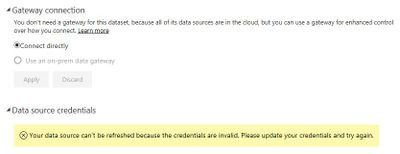
When I looked into the data gateway settings, it shows that this type of connection does not need any data gateway but gives me an error. See below screen-print. Am I missing anything? Any help will be appreciated.
Thanks,
Lakshay
A new Power BI DataViz World Championship is coming this June! Don't miss out on submitting your entry.
Share feedback directly with Fabric product managers, participate in targeted research studies and influence the Fabric roadmap.
| User | Count |
|---|---|
| 5 | |
| 4 | |
| 4 | |
| 3 | |
| 3 |
| User | Count |
|---|---|
| 11 | |
| 10 | |
| 8 | |
| 7 | |
| 5 |