This time we’re going bigger than ever. Fabric, Power BI, SQL, AI and more. We're covering it all. You won't want to miss it.
Learn moreDid you hear? There's a new SQL AI Developer certification (DP-800). Start preparing now and be one of the first to get certified. Register now
Hello all,
I connect Power BI desktop with excel data source which is placed on a SharePoint. When I upload the visualization on power BI app, the data does not automatically get refreshed when any changes are made to this excel.
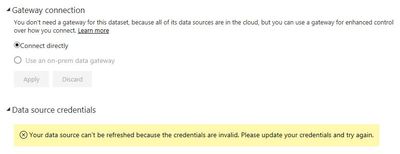
When I looked into the data gateway settings, it shows that this type of connection does not need any data gateway but gives me an error. See below screen-print. Am I missing anything? Any help will be appreciated.
Thanks,
Lakshay
Solved! Go to Solution.
Based on the error message there would be 2 things that need to be fixed:
Hello all,
I connect Power BI desktop with excel data source which is placed on a SharePoint. When I upload the visualization on power BI app, the data does not automatically get refreshed when any changes are made to this excel.
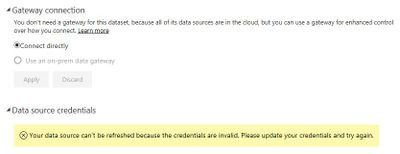
When I looked into the data gateway settings, it shows that this type of connection does not need any data gateway but gives me an error. See below screen-print. Am I missing anything? Any help will be appreciated.
Thanks,
Lakshay
Check out the April 2026 Power BI update to learn about new features.
Sign up to receive a private message when registration opens and key events begin.
If you have recently started exploring Fabric, we'd love to hear how it's going. Your feedback can help with product improvements.
| User | Count |
|---|---|
| 7 | |
| 5 | |
| 4 | |
| 4 | |
| 3 |