Get certified for free when you join Fabric Data Days 2026 and dive into Fabric, Power BI, SQL, AI, and other essential data skills.
Join nowJuly 7 - July 17 | Round 2 of the Power BI Dataviz World Championships. Don't miss your chance! Learn more
Hi All,
Just started with power query, I have an excel template that I use which gives me the data I need with the columns set up, however on a monthly basis the csv file that comes through, has the data set in different columns, this is just how it comes in, is there any way of being able to set this up so that a column looks up the whole data set from the csv file and pulls through the correct column.
eg...
My template is setup like this
| First Name | Surname | Age | Gift Amount |
| Test | One | 25 | 20 |
| Test | Two | 36 | 20 |
| Test | Three | 41 | 10 |
| Test | Four | 28 | 15 |
Each month the data could come in as:
| Surname | Gift Amount | First Name | Age |
| One | 20 | Test | 25 |
| Two | 20 | Test | 36 |
| Three | 10 | Test | 41 |
| Four | 15 | Test | 28 |
or
| Gift Amount | Surname | Age | First Name |
| 20 | One | 25 | Test |
| 20 | Two | 36 | Test |
| 10 | Three | 41 | Test |
| 15 | Four | 28 | Test |
Is there a way of being able to set up within the data model a way of it automatically looking up the correct column and pulling it through?
Thanks
Solved! Go to Solution.
Hi @UK_User123456 ,
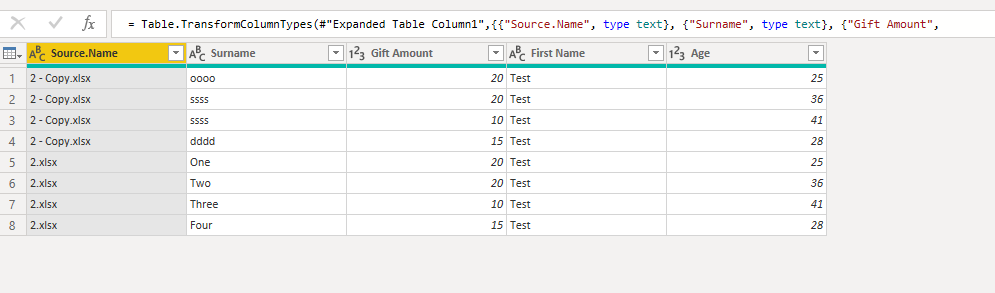
If you get data from folder, then your data will be append automatically by column name.
Hi @UK_User123456 ,
If you get data from folder, then your data will be append automatically by column name.
The order really shouldn't matter as long as the csv isn't adding in more columns from month to month that moves the columns you want out of the field of view?
Join us in Barcelona for FabCon and SQLCon, the Fabric, Power BI, SQL, and AI community event. Save €200 with code FABCMTY200.
Join Fabric Data Days 2026: 60 days of free live/on-demand sessions, challenges, study groups, and certification opportunities.