cancel
Showing results for 
Search instead for 
Did you mean: 

The Power BI Data Visualization World Championships is back! Get ahead of the game and start preparing now! Learn more

Reply
DrayCount
New Member

Data Table

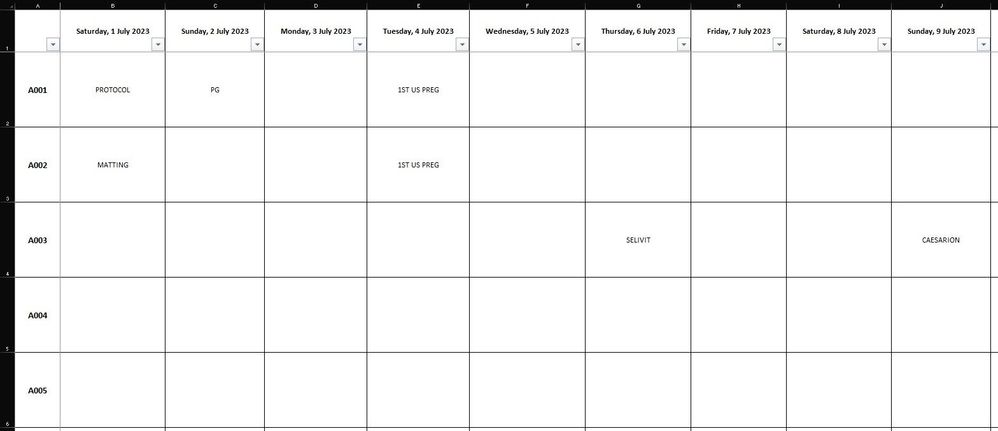
I have an excel sheet named as Parent. From cell B1 to NC1 dates are mentioned. In cell A2 to A501, Tag Numbers are mentioned. Cell A1 is left intentionally. Animal Treatments are mentioned against each code number under the relevant date. Means treatments are mentioned in cells from 1Rx2C to 500Rx366C against relevant code under the relevant date. For example, if I do PG treatment of number A001 on 21st July 2023, I will type PG against goat number A001 under the date 21st July 2023. I will upload the excel file from get data from excel option in PowerBI.

Now I want to create “Data table” in PowerBI which contains Date in column 1 of that data table, Tag Numbers in Column 2, and Treatments in Column3. Like:

Tag NumbersTreatmentsDate
A001PG07/01/2023
A002SELIVIT09/05/2023
A001OV

09/16/2023


I want to Creat Data Table. Please Help!
Attached is the Screenshot of Excel File which i'll upload for data source. 

Screenshot 2023-08-11 133656.png


Screenshot 2023-08-11 133656.jpg

1 ACCEPTED SOLUTION
Anonymous
Not applicable

Hi @DrayCount 

You can refer to the following code to Advanced Editor in power query.

Sample data 

vxinruzhumsft_1-1691991477898.png

let
    Source = Table.FromRows(Json.Document(Binary.Decompress(Binary.FromText("i45WcjQwMFTSUQoI8g/xd/b3ATHdgQQQGQaHKIQGKwQEubtCBBAoVges0QjI9nUMCfH0c4fLEdZljC6uoxTs6uMZ5hkC5zs7ugY7Bnn6+8H0mGDqwTDXFK+aWAA=", BinaryEncoding.Base64), Compression.Deflate)), let _t = ((type nullable text) meta [Serialized.Text = true]) in type table [Column1 = _t, #"2023/7/1" = _t, #"2023/7/2" = _t, #"2023/7/3" = _t, #"2023/7/4" = _t, #"2023/7/5" = _t, #"2023/7/6" = _t, #"2023/7/7" = _t, #"2023/7/8" = _t, #"2023/7/9" = _t]),
    #"Changed Type" = Table.TransformColumnTypes(Source,{{"Column1", type text}, {"2023/7/1", type text}, {"2023/7/2", type text}, {"2023/7/3", type text}, {"2023/7/4", type text}, {"2023/7/5", type text}, {"2023/7/6", type text}, {"2023/7/7", type text}, {"2023/7/8", type text}, {"2023/7/9", type text}}),
    #"Unpivoted Other Columns" = Table.UnpivotOtherColumns(#"Changed Type", {"Column1"}, "Attribute", "Value"),
    #"Renamed Columns" = Table.RenameColumns(#"Unpivoted Other Columns",{{"Attribute", "Date"}, {"Column1", "Tag"}, {"Value", "Treatments"}}),
    #"Changed Type1" = Table.TransformColumnTypes(#"Renamed Columns",{{"Date", type date}}),
    #"Filtered Rows" = Table.SelectRows(#"Changed Type1", each ([Treatments] <> ""))
in
    #"Filtered Rows"

Output
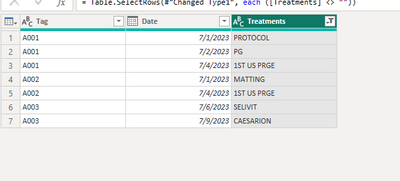
vxinruzhumsft_0-1691991461952.png

Best Regards!

Yolo Zhu

If this post helps, then please consider Accept it as the solution to help the other members find it more quickly.


View solution in original post

1 REPLY 1
Anonymous
Not applicable

Hi @DrayCount 

You can refer to the following code to Advanced Editor in power query.

Sample data 

vxinruzhumsft_1-1691991477898.png

let
    Source = Table.FromRows(Json.Document(Binary.Decompress(Binary.FromText("i45WcjQwMFTSUQoI8g/xd/b3ATHdgQQQGQaHKIQGKwQEubtCBBAoVges0QjI9nUMCfH0c4fLEdZljC6uoxTs6uMZ5hkC5zs7ugY7Bnn6+8H0mGDqwTDXFK+aWAA=", BinaryEncoding.Base64), Compression.Deflate)), let _t = ((type nullable text) meta [Serialized.Text = true]) in type table [Column1 = _t, #"2023/7/1" = _t, #"2023/7/2" = _t, #"2023/7/3" = _t, #"2023/7/4" = _t, #"2023/7/5" = _t, #"2023/7/6" = _t, #"2023/7/7" = _t, #"2023/7/8" = _t, #"2023/7/9" = _t]),
    #"Changed Type" = Table.TransformColumnTypes(Source,{{"Column1", type text}, {"2023/7/1", type text}, {"2023/7/2", type text}, {"2023/7/3", type text}, {"2023/7/4", type text}, {"2023/7/5", type text}, {"2023/7/6", type text}, {"2023/7/7", type text}, {"2023/7/8", type text}, {"2023/7/9", type text}}),
    #"Unpivoted Other Columns" = Table.UnpivotOtherColumns(#"Changed Type", {"Column1"}, "Attribute", "Value"),
    #"Renamed Columns" = Table.RenameColumns(#"Unpivoted Other Columns",{{"Attribute", "Date"}, {"Column1", "Tag"}, {"Value", "Treatments"}}),
    #"Changed Type1" = Table.TransformColumnTypes(#"Renamed Columns",{{"Date", type date}}),
    #"Filtered Rows" = Table.SelectRows(#"Changed Type1", each ([Treatments] <> ""))
in
    #"Filtered Rows"

Output

vxinruzhumsft_0-1691991461952.png

Best Regards!

Yolo Zhu

If this post helps, then please consider Accept it as the solution to help the other members find it more quickly.


Helpful resources

Announcements
Power BI DataViz World Championships

Power BI Dataviz World Championships

The Power BI Data Visualization World Championships is back! Get ahead of the game and start preparing now!

December 2025 Power BI Update Carousel

Power BI Monthly Update - December 2025

Check out the December 2025 Power BI Holiday Recap!

FabCon Atlanta 2026 carousel

FabCon Atlanta 2026

Join us at FabCon Atlanta, March 16-20, for the ultimate Fabric, Power BI, AI and SQL community-led event. Save $200 with code FABCOMM.

Top Solution Authors