This time we’re going bigger than ever. Fabric, Power BI, SQL, AI and more. We're covering it all. You won't want to miss it.
Learn moreDid you hear? There's a new SQL AI Developer certification (DP-800). Start preparing now and be one of the first to get certified. Register now
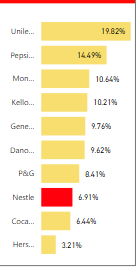
I have made a bar chart out of some data. The target company is highlighted in red.
Now, if I change my data in the excel sheet(with a different list of companies and a different target) and then click the refresh button on PBI, how can I get PBI to identify the new target company and highlight it in red?
Appreciate your help!
Hi @Saloni,
In Power BI, there is no OOTB feature for us to specify color based on a condition for the chart visual. So in your scenario, each time the data is refreshed and tartget is chnaged, you need to highlight the new target manually.
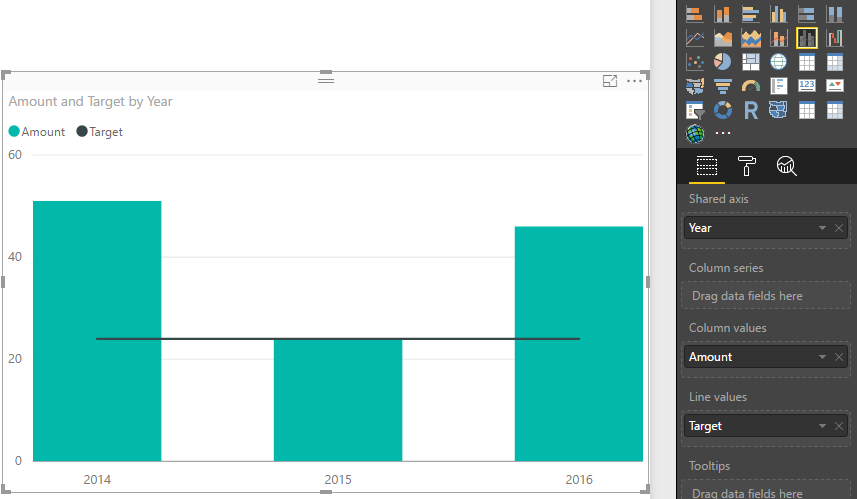
To work around the issue, you can try to add one column field in the Excel file to identify the target, then use the combo chart (eg: Line and clustered column chart), place the this new column as line values.
Best Regards,
Qiuyun Yu
Hi
If you use local excel file to create a powerbi report then it will import all the data from excel into Power Bi services (cloud). It will not have a connection to your local file so if you do any changes in your excel then it will not affect.
In case, if you use excel file from one drive or SharePoint then it will have a direct connection so if any changes happened on data then you can see the changes on the report.
Thanks
Hari
If I click on the refresh button, the data should change right? The new data in the excel sheet should appear on all the charts. My question is how can Power BI identify the new target company and highlight it in a different color?
Check out the April 2026 Power BI update to learn about new features.
If you have recently started exploring Fabric, we'd love to hear how it's going. Your feedback can help with product improvements.
A new Power BI DataViz World Championship is coming this June! Don't miss out on submitting your entry.