Join us at FabCon Atlanta from March 16 - 20, 2026, for the ultimate Fabric, Power BI, AI and SQL community-led event. Save $200 with code FABCOMM.
Register now!Get Fabric certified for FREE! Don't miss your chance! Learn more
Hi all,
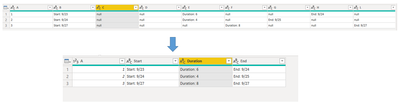
I have a dataset in format:
| 1 | Start: 9/23 | null | null | Duration: 6 | null | null | End: 9/24 | null |
| 2 | Start: 9/24 | null | null | Duration: 4 | null | End: 9/25 | null | null |
| 3 | Start: 9/27 | null | null | null | Duration: 8 | null | null | End: 9/27 |
I want to convert it to format:
| 1 | Start: 9/23 | Duration: 6 | End: 9/24 |
| 2 | Start: 9/24 | Duration: 4 | End: 9/25 |
| 3 | Start: 9/27 | Duration: 8 | End: 9/27 |
Positions of start, duration, end keeps changing. Can somebody please help me how to achieve the above table dynamically?
I would really appreciate your help. Thanks!
Solved! Go to Solution.
Hi @anshpalash ,
Here is the whole M syntax, please check:
let
Source = Table.FromRows(Json.Document(Binary.Decompress(Binary.FromText("i45WMlTSUQouSSwqsVKw1DcyBvLySnNyEJRLaVFiSWZ+npWCGYaca14KWJcJTChWJ1rJCMVAEzwGmmCaZIqmHGSgMYqB5hgGYphrgdOh5kqxsQA=", BinaryEncoding.Base64), Compression.Deflate)), let _t = ((type nullable text) meta [Serialized.Text = true]) in type table [A = _t, B = _t, C = _t, D = _t, E = _t, F = _t, G = _t, H = _t, L = _t]),
#"Changed Type" = Table.TransformColumnTypes(Source,{{"A", Int64.Type}, {"B", type text}, {"C", type text}, {"D", type text}, {"E", type text}, {"F", type text}, {"G", type text}, {"H", type text}, {"L", type text}}),
#"Unpivoted Other Columns" = Table.UnpivotOtherColumns(#"Changed Type", {"A"}, "Attribute", "Value"),
#"Filtered Rows" = Table.SelectRows(#"Unpivoted Other Columns", each ([Value] <> "null")),
#"Added Custom" = Table.AddColumn(#"Filtered Rows", "Custom", each Text.Split([Value],":"){0}),
#"Removed Columns" = Table.RemoveColumns(#"Added Custom",{"Attribute"}),
#"Pivoted Column" = Table.Pivot(#"Removed Columns", List.Distinct(#"Removed Columns"[Custom]), "Custom", "Value")
in
#"Pivoted Column"
Best Regards,
Eyelyn Qin
If this post helps, then please consider Accept it as the solution to help the other members find it more quickly.
Hi @anshpalash ,
Here is the whole M syntax, please check:
let
Source = Table.FromRows(Json.Document(Binary.Decompress(Binary.FromText("i45WMlTSUQouSSwqsVKw1DcyBvLySnNyEJRLaVFiSWZ+npWCGYaca14KWJcJTChWJ1rJCMVAEzwGmmCaZIqmHGSgMYqB5hgGYphrgdOh5kqxsQA=", BinaryEncoding.Base64), Compression.Deflate)), let _t = ((type nullable text) meta [Serialized.Text = true]) in type table [A = _t, B = _t, C = _t, D = _t, E = _t, F = _t, G = _t, H = _t, L = _t]),
#"Changed Type" = Table.TransformColumnTypes(Source,{{"A", Int64.Type}, {"B", type text}, {"C", type text}, {"D", type text}, {"E", type text}, {"F", type text}, {"G", type text}, {"H", type text}, {"L", type text}}),
#"Unpivoted Other Columns" = Table.UnpivotOtherColumns(#"Changed Type", {"A"}, "Attribute", "Value"),
#"Filtered Rows" = Table.SelectRows(#"Unpivoted Other Columns", each ([Value] <> "null")),
#"Added Custom" = Table.AddColumn(#"Filtered Rows", "Custom", each Text.Split([Value],":"){0}),
#"Removed Columns" = Table.RemoveColumns(#"Added Custom",{"Attribute"}),
#"Pivoted Column" = Table.Pivot(#"Removed Columns", List.Distinct(#"Removed Columns"[Custom]), "Custom", "Value")
in
#"Pivoted Column"
Best Regards,
Eyelyn Qin
If this post helps, then please consider Accept it as the solution to help the other members find it more quickly.
I would use Table.ToRows to make each of your rows a list. Then use each List.RemoveNulls to make a custom column with the non null values from each row. Then you can use e Table.FromRows to change it right back into a table.
--Nate
Share feedback directly with Fabric product managers, participate in targeted research studies and influence the Fabric roadmap.
Check out the January 2026 Power BI update to learn about new features.
| User | Count |
|---|---|
| 12 | |
| 12 | |
| 10 | |
| 6 | |
| 5 |