Join us in Barcelona for FabCon and SQLCon, September 28 - October 1, 2026.
This is best Fabric, Power BI, SQL and AI community event. How do we know? The last event sold out! Save €200 with code FABCMTY200.
Register now- Power BI forums
- Get Help with Power BI
- Desktop
- Service
- Report Server
- Power Query
- Mobile Apps
- Developer
- DAX Commands and Tips
- Custom Visuals Development Discussion
- Health and Life Sciences
- Power BI Spanish forums
- Translated Spanish Desktop
- Training and Consulting
- Instructor Led Training
- Dashboard in a Day for Women, by Women
- Galleries
- Data Stories Gallery
- Themes Gallery
- Contests Gallery
- QuickViz Gallery
- Quick Measures Gallery
- Visual Calculations Gallery
- Fabric Apps Gallery
- Notebook Gallery
- Translytical Task Flow Gallery
- TMDL Gallery
- R Script Showcase
- Webinars and Video Gallery
- Ideas
- Custom Visuals Ideas (read-only)
- Issues
- Issues
- Events
- Upcoming Events
The Fabric community is upgrading! Read all of the details including the timeline and what you can expect. Learn more
- Power BI forums
- Forums
- Get Help with Power BI
- Power Query
- Re: Daily Operation Job Count Plan
- Subscribe to RSS Feed
- Mark Topic as New
- Mark Topic as Read
- Float this Topic for Current User
- Bookmark
- Subscribe
- Printer Friendly Page

- Mark as New
- Bookmark
- Subscribe
- Mute
- Subscribe to RSS Feed
- Permalink
- Report Inappropriate Content
Daily Operation Job Count Plan
Hi
I am new to Power BI and this group, so apologies if this is a daft question but help would be appreciated, thank you.
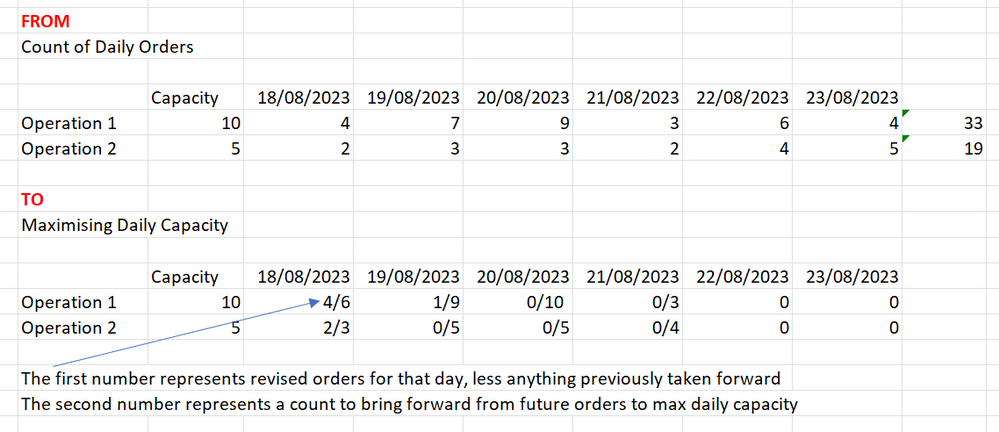
I have a set of data that shows daily orders booked in by operation. I also know the daily capacity for each operation.
I would like to be able maximise daily capacity and bring future orders forward, to show what can be done in advance.
I would like to see: -
- A count of what’s booked in that day.
- Re-calculate and bring anything forward to achieve daily capacity.
- Re-calculate future numbers with re-calculated numbers from point 2.
I have tried to capture the ‘ what I have’ and the ‘what I need’ in the image attached.
Thank you in advance


- Mark as New
- Bookmark
- Subscribe
- Mute
- Subscribe to RSS Feed
- Permalink
- Report Inappropriate Content
Hi
Another solution
let
Source = Table.FromRows(Json.Document(Binary.Decompress(Binary.FromText("i45WcjRU0lEyNAASJkBsDsSWQGwMxGZgsVgdoBojINMUiI2gUsZQtglYPDYWAA==", BinaryEncoding.Base64), Compression.Deflate)), let _t = ((type nullable text) meta [Serialized.Text = true]) in type table [#"Operation Number" = _t, Capacity = _t, #"08/18/2023" = _t, #"08/19/2023" = _t, #"08/20/2023" = _t, #"08/21/2023" = _t, #"08/22/2023" = _t, #"08/23/2023" = _t]),
Unpivoted = Table.UnpivotOtherColumns(Source, {"Operation Number", "Capacity"}, "Date", "Order Count"),
Date = Table.TransformColumns(Unpivoted,{{"Date", each Date.FromText(_,[Format="MM/dd/yyyy"]), type date}}),
Types = Table.TransformColumnTypes(Date,{{"Capacity", Int64.Type}, {"Order Count", Int64.Type}}),
AutoJoin = Table.NestedJoin(Types, {"Operation Number"}, Types, {"Operation Number"}, "Data", JoinKind.LeftOuter),
Add_Total_Operating_Number = Table.AddColumn(AutoJoin, "Operation Number Total", each List.Sum([Data][Order Count])),
Expand = Table.ExpandTableColumn(Add_Total_Operating_Number, "Data", {"Capacity", "Date", "Order Count"}, {"Capacity.1", "Date.1", "Order Count.1"}),
Filter = Table.SelectRows(Expand, each [Date.1] <= [Date]),
Group = Table.Group(Filter, {"Operation Number", "Capacity", "Date", "Order Count","Operation Number Total"}, {{"Running_Capacity", each List.Sum([Capacity.1]), Int64.Type}, {"Running_Order", each List.Sum([Order Count.1]), Int64.Type}}),
Add_New_Daily = Table.AddColumn(Group, "New Daily",
     each List.Max({0,[Running_Order]-[Running_Capacity]+[Capacity]})),
Add_Pulled_Ahead_Count = Table.AddColumn(Add_New_Daily, "Pulled Ahead Count",
     each List.Min({[Capacity],[Running_Capacity]-[Running_Order], List.Max({0,[Operation Number Total]+[Capacity]-[Running_Capacity]})})),
Add_Maximized_Daily_Count = Table.AddColumn(Add_Pulled_Ahead_Count, "Maximized Daily Count", each Text.From([New Daily]) &"/"& Text.From([Pulled Ahead Count]), type text),
Columns = Table.SelectColumns(Add_Maximized_Daily_Count,{"Operation Number", "Capacity", "Date", "Maximized Daily Count"}),
Pivot = Table.Pivot(Table.TransformColumnTypes(Columns, {{"Date", type text}}, "fr"), List.Distinct(Table.TransformColumnTypes(Columns, {{"Date", type text}}, "fr")[Date]), "Date", "Maximized Daily Count")
in
Pivot
Stéphane
- Mark as New
- Bookmark
- Subscribe
- Mute
- Subscribe to RSS Feed
- Permalink
- Report Inappropriate Content
Thank you
- Mark as New
- Bookmark
- Subscribe
- Mute
- Subscribe to RSS Feed
- Permalink
- Report Inappropriate Content
In the diagram that i showed I displayed the 'daily number' and the 'brought forward number' together to maximise capacity. These numbers were visible rather than a total. Can I as, will this solution still show the breakdown? Thank you in advance

- Mark as New
- Bookmark
- Subscribe
- Mute
- Subscribe to RSS Feed
- Permalink
- Report Inappropriate Content
The following code should show the breakdown...

let
Source = Table.FromRows(Json.Document(Binary.Decompress(Binary.FromText("i45WcjRU0lEyNAASJkBsDsSWQGwMxGZgsVgdoBojINMUiI2gUsZQtglYPDYWAA==", BinaryEncoding.Base64), Compression.Deflate)), let _t = ((type nullable text) meta [Serialized.Text = true]) in type table [#"Operation Number" = _t, Capacity = _t, #"08/18/2023" = _t, #"08/19/2023" = _t, #"08/20/2023" = _t, #"08/21/2023" = _t, #"08/22/2023" = _t, #"08/23/2023" = _t]),
#"Unpivoted Other Columns" = Table.UnpivotOtherColumns(Source, {"Operation Number", "Capacity"}, "Date", "Order Count"),
#"Grouped Rows" = Table.Group(#"Unpivoted Other Columns", {"Operation Number"}, {{"Count", each _, type table [Operation Number=nullable text, Capacity=nullable number, Date=text, Order Count=number]}}),
Custom1 = Table.AddColumn(#"Grouped Rows", "IndexAdded", each Table.AddIndexColumn([Count],"Index",0, 1)),
#"Removed Columns" = Table.RemoveColumns(Custom1,{"Count"}),
#"Expanded Index" = Table.ExpandTableColumn(#"Removed Columns", "IndexAdded", {"Capacity", "Date", "Order Count", "Index"}, {"Capacity", "Date", "Order Count", "Index"}),
#"Changed Type" = Table.TransformColumnTypes(#"Expanded Index",{{"Operation Number", type text}, {"Capacity", Int64.Type}, {"Date", type date}, {"Order Count", Int64.Type}, {"Index", Int64.Type}}),
#"Added Custom" = Table.AddColumn(#"Changed Type", "runningTotal", each List.Sum(Table.SelectRows(#"Changed Type", (y)=> [Operation Number] = y[Operation Number] and [Date] >= y[Date])[Order Count]), type number),
#"Added Custom1" = Table.AddColumn(#"Added Custom", "newDaily", each if [runningTotal]-([Index] * [Capacity]) < 0 then 0 else [runningTotal]-([Index] * [Capacity]), type number),
#"Added Custom2" = Table.AddColumn(#"Added Custom1", "Operation Number Order Sum", each List.Sum(Table.SelectRows(#"Added Custom1", (x)=> [Operation Number] = x[Operation Number])[Order Count]), type number),
Custom2 = Table.AddColumn(#"Added Custom2", "maxIndex", each List.Max(Table.SelectRows(#"Added Custom2", each Number.Mod([Operation Number Order Sum], [Capacity] * ([Index]+1)) <> [Operation Number Order Sum])[Index]), type number),
Custom3 = Table.AddColumn(Custom2, "pulledAheadCount", each (if [Index] <= [maxIndex] then [Capacity] else if [Index] = [maxIndex] + 1 then [Operation Number Order Sum] - (([maxIndex] + 1) * [Capacity]) else 0) - [newDaily], type number),
#"Added Custom3" = Table.AddColumn(Custom3, "Maximized Daily Count", each Number.ToText([newDaily]) & "/" & Number.ToText([pulledAheadCount]), type text),
#"Removed Columns1" = Table.RemoveColumns(#"Added Custom3",{"Order Count", "Index", "runningTotal", "newDaily", "Operation Number Order Sum", "maxIndex", "pulledAheadCount"}),
#"Pivoted Column" = Table.Pivot(Table.TransformColumnTypes(#"Removed Columns1", {{"Date", type text}}, "en-US"), List.Distinct(Table.TransformColumnTypes(#"Removed Columns1", {{"Date", type text}}, "en-US")[Date]), "Date", "Maximized Daily Count")
in
#"Pivoted Column"
Proud to be a Super User! |  |
- Mark as New
- Bookmark
- Subscribe
- Mute
- Subscribe to RSS Feed
- Permalink
- Report Inappropriate Content
Thank you very much
- Mark as New
- Bookmark
- Subscribe
- Mute
- Subscribe to RSS Feed
- Permalink
- Report Inappropriate Content
Thank you very much
- Mark as New
- Bookmark
- Subscribe
- Mute
- Subscribe to RSS Feed
- Permalink
- Report Inappropriate Content
Starting with a table,

You can get the resulting table,

with the follwing code...
let
Source = Table.FromRows(Json.Document(Binary.Decompress(Binary.FromText("i45WcjRU0lEyNAASJkBsDsSWQGwMxGZgsVgdoBojINMUiI2gUsZQtglYPDYWAA==", BinaryEncoding.Base64), Compression.Deflate)), let _t = ((type nullable text) meta [Serialized.Text = true]) in type table [#"Operation Number" = _t, Capacity = _t, #"08/18/2023" = _t, #"08/19/2023" = _t, #"08/20/2023" = _t, #"08/21/2023" = _t, #"08/22/2023" = _t, #"08/23/2023" = _t]),
#"Unpivoted Other Columns" = Table.UnpivotOtherColumns(Source, {"Operation Number", "Capacity"}, "Date", "Order Count"),
#"Grouped Rows" = Table.Group(#"Unpivoted Other Columns", {"Operation Number"}, {{"Count", each _, type table [Operation Number=nullable text, Capacity=nullable number, Date=text, Order Count=number]}}),
Custom1 = Table.AddColumn(#"Grouped Rows", "IndexAdded", each Table.AddIndexColumn([Count],"Index",1, 1)),
#"Removed Columns" = Table.RemoveColumns(Custom1,{"Count"}),
#"Expanded Index" = Table.ExpandTableColumn(#"Removed Columns", "IndexAdded", {"Capacity", "Date", "Order Count", "Index"}, {"Capacity", "Date", "Order Count", "Index"}),
#"Changed Type" = Table.TransformColumnTypes(#"Expanded Index",{{"Operation Number", type text}, {"Capacity", Int64.Type}, {"Date", type date}, {"Order Count", Int64.Type}, {"Index", Int64.Type}}),
#"Added Custom" = Table.AddColumn(#"Changed Type", "Operation Number Order Sum", each List.Sum(Table.SelectRows(#"Changed Type", (x)=> x[Operation Number] = [Operation Number])[Order Count]), type number),
#"Added Custom2" = Table.AddColumn(#"Added Custom", "maxIndex", each List.Max(Table.SelectRows(#"Added Custom", each Number.Mod([Operation Number Order Sum], [Capacity] * [Index]) <> [Operation Number Order Sum])[Index]), type number),
#"Added Custom1" = Table.AddColumn(#"Added Custom2", "optimizedOrderCount", each if [Index] <= [maxIndex] then [Capacity] else if [Index] = [maxIndex] + 1 then [Operation Number Order Sum] - ([maxIndex] * [Capacity]) else 0, type number),
#"Removed Columns1" = Table.RemoveColumns(#"Added Custom1",{"Order Count", "Index", "Operation Number Order Sum", "maxIndex"}),
#"Pivoted Column" = Table.Pivot(Table.TransformColumnTypes(#"Removed Columns1", {{"Date", type text}}, "en-US"), List.Distinct(Table.TransformColumnTypes(#"Removed Columns1", {{"Date", type text}}, "en-US")[Date]), "Date", "optimizedOrderCount", List.Sum)
in
#"Pivoted Column"
Proud to be a Super User! | |
Helpful resources

FabCon & SQLCon – Barcelona 2026
Join us in Barcelona for FabCon and SQLCon, the Fabric, Power BI, SQL, and AI community event. Save €200 with code FABCMTY200.

Power BI DataViz World Championships - June 2026
A new Power BI DataViz World Championship is coming this June! Don't miss out on submitting your entry.


