cancel
Showing results for 
Search instead for 
Did you mean: 

Level up your Power BI skills this month - build one visual each week and tell better stories with data! Get started

Reply
NathanPzi
Frequent Visitor

DAX Relation between DirectQuery and Import

Hello,
I have a report that contains multiple tables, one is in 'Import' mode, and the other is in 'DirectQuery' mode and is linked to another report.
Import: Grille tarifaire[Moyenne]
DirectQuery: Affaire[TJM Vendu]
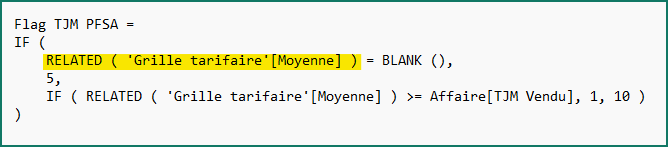
I'm trying to create a calculated column with this function: Flag TJM PFSA = if(RELATED('Grille tarifaire'[Moyenne]) = BLANK(), 5, if(RELATED('Grille tarifaire'[Moyenne]) >= Affaire[TJM Vendu],1,10))

But Power BI is giving me this error: The column 'Grille tarifaire[Moyenne]' either doesn't exist or doesn't have a relationship with any table available in the current context.

However, I have established a relationship between the two tables using a reference, and the relationship is active with the correct cardinality.
And when creating the column using "RELATED", Grille tarifaire shows up as a suggestion.

If anyone has any tips or a solution to my problem, I would greatly appreciate it.

Thank you 🙂

1 ACCEPTED SOLUTION
Anonymous
Not applicable

Hi @NathanPzi ,


vcgaomsft_0-1685415393286.png

Depending on where you create the calculated column; they can have some limitations. If you create a calculated column in an Import table or a calculated table, then there will be no limitation. However, if you create a calculated column in a DirectQuery table, then in the expression for the column only columns from the same table can be used.

Composite Model in Power BI; DirectQuery and Import Data Combined - RADACAD


Best Regards,
Gao

Community Support Team


If there is any post helps, then please consider Accept it as the solution  to help the other members find it more quickly. If I misunderstand your needs or you still have problems on it, please feel free to let us know. Thanks a lot!

How to get your questions answered quickly --  How to provide sample data in the Power BI Forum

View solution in original post

2 REPLIES 2
Anonymous
Not applicable

Hi @NathanPzi ,


vcgaomsft_0-1685415393286.png

Depending on where you create the calculated column; they can have some limitations. If you create a calculated column in an Import table or a calculated table, then there will be no limitation. However, if you create a calculated column in a DirectQuery table, then in the expression for the column only columns from the same table can be used.

Composite Model in Power BI; DirectQuery and Import Data Combined - RADACAD


Best Regards,
Gao

Community Support Team


If there is any post helps, then please consider Accept it as the solution  to help the other members find it more quickly. If I misunderstand your needs or you still have problems on it, please feel free to let us know. Thanks a lot!

How to get your questions answered quickly --  How to provide sample data in the Power BI Forum

lbendlin
Super User
Super User

Please show your data model. RELATED only works on the "Many" end of a 1:M relationship with single search direction.

Helpful resources

Announcements
April Power BI Update Carousel

Power BI Monthly Update - April 2026

Check out the April 2026 Power BI update to learn about new features.

Fabric SQL PBI Data Days

Data Days 2026 coming soon!

Sign up to receive a private message when registration opens and key events begin.

New to Fabric survey Carousel

New to Fabric Survey

If you have recently started exploring Fabric, we'd love to hear how it's going. Your feedback can help with product improvements.

Power BI DataViz World Championships carousel

Power BI DataViz World Championships - June 2026

A new Power BI DataViz World Championship is coming this June! Don't miss out on submitting your entry.

Top Kudoed Authors