cancel
Showing results for 
Search instead for 
Did you mean: 

July 7 - July 17 | Round 2 of the Power BI Dataviz World Championships. Don't miss your chance! Learn more

Reply
raghukumarch
Frequent Visitor

DAX Help for Conditional Column

Hi, 

Could you please help me in achieving this either in DAX or PowerQuery.
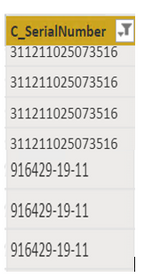
One of my column in table has values like this.

raghukumarch_0-1660667276824.png

I wanted to create another column in same table by adding "0" in the begining for the values which dose not contain "-" and other value which contains "-" should remains same as it is. 

For example column 'C_SerialNumber' have values like "311211025073516" and "916429-19-11"

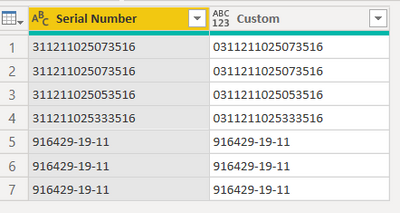
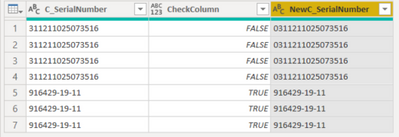
I wanted to add '0' in the begining if the value DOES NOT Contain '-'. So the output will be "0311211025073516" and other values remains same.


Thanks

RK

1 ACCEPTED SOLUTION
AnkitKukreja
Super User
Super User

Hi! @raghukumarch 


Please use this M code.


= Table.AddColumn(#"Changed Type", "Custom", each if Text.Contains([Serial Number], "-") then [Serial Number] else "0" & Text.From ( [Serial Number]

) )


AnkitKukreja_0-1660675297318.png


For Power BI trainings or support dm or reach out to me on LinkedIn.
If my response has successfully addressed your question or concern, I kindly request that you mark this post as resolved. Additionally, if you found my assistance helpful, a thumbs-up would be greatly appreciated.

Thanks,
Ankit Kukreja
www.linkedin.com/in/ankit-kukreja1904
https://topmate.io/ankit_kukreja/

View solution in original post

2 REPLIES 2
bilalrana
Resolver I
Resolver I

Dear @raghukumarch ,

I have implemented your scenario, Here's the few steps to achieve the required output.

Go to Home - > Transform Data 


Open the Query which contains the column C_SerialNumber.

Go to - > Add Column - > Custom Column
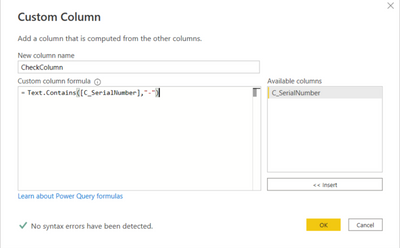
bilalrana_0-1660733800097.png


New Column Name: CheckColumn

Custom column formula: Text.Contains([C_SerialNumber],"-")

Now click on OK.


Now again click on  Add Column - > Custom Column
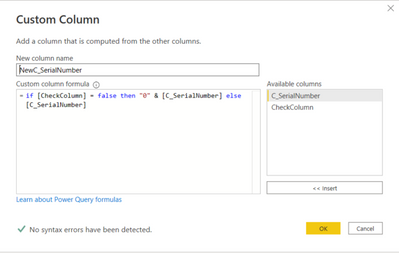
bilalrana_1-1660733800124.png


New Column Name: NewC_SerialNumber

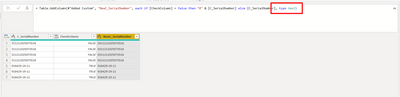
Custom column formula: if [CheckColumn] = false then "0" & [C_SerialNumber] else [C_SerialNumber]

Now click on OK.

Now, check on the formula bar, if the type isn't set to text then write it in a way as below screen short and click on the tick.
bilalrana_2-1660733800127.png


Here's the desire output in a new column.
bilalrana_3-1660733800130.png


Please like the reply and accept it as a solution to help the Power BI Community.

AnkitKukreja
Super User
Super User

Hi! @raghukumarch 


Please use this M code.


= Table.AddColumn(#"Changed Type", "Custom", each if Text.Contains([Serial Number], "-") then [Serial Number] else "0" & Text.From ( [Serial Number]

) )


AnkitKukreja_0-1660675297318.png


For Power BI trainings or support dm or reach out to me on LinkedIn.
If my response has successfully addressed your question or concern, I kindly request that you mark this post as resolved. Additionally, if you found my assistance helpful, a thumbs-up would be greatly appreciated.

Thanks,
Ankit Kukreja
www.linkedin.com/in/ankit-kukreja1904
https://topmate.io/ankit_kukreja/

Helpful resources

Announcements
FabCon and SQLCon Barcelona 2026

FabCon & SQLCon – Barcelona 2026

Join us in Barcelona for FabCon and SQLCon, the Fabric, Power BI, SQL, and AI community event. Save €200 with code FABCMTY200.

60 days of Data Days Carousel

Data Days 2026

Join Data Days 2026: 60 days of free live/on-demand sessions, challenges, study groups, and certification opportunities.

Power BI DataViz World Championships carousel

Power BI DataViz World Championships - June 2026

A new Power BI DataViz World Championship is coming this June! Don't miss out on submitting your entry.

Top Solution Authors