cancel
Showing results for 
Search instead for 
Did you mean: 

The Power BI Data Visualization World Championships is back! Get ahead of the game and start preparing now! Learn more

Reply
Mattonpowerbi
Frequent Visitor

Customer segmentation using DATESINPERIOD

Good morning everyone,


I'm trying to segment customers over time so that I can see, for any given date (point in time), how many customers had purchased only once in the previous 4 weeks, how many only twice, how many 3 times etc.  I found what seemed to be a really helpful post about creating an 'active customer' view over time here.


However, for some reason, I can't get this to work: and it's the datesinperiod bit that seems to be the issue. Instead of showing the number of orders in the last 28 days (for each date), it just shows the number of orders on any given day (mostly 1!) This is my code:


Active customers = 

SUMMARIZE(
'1_Orders',
'1_Orders'[ORD.customer_id],
_Dates[date],
"Orders last 4 weeks", CALCULATE(DISTINCTCOUNT('1_Orders'[ORD.id]),
DATESINPERIOD(_Dates[date],MIN(_Dates[date]),-28,DAY)
)
)

I'm using two tables, my orders table and my dates table (connected so that by the date the order was placed), to create an "active customers" table, that I can then create some measures for counting how many customers were how active over time.


I hope this makes sense, I'm really stumped so would be really grateful for any wisedom!


Thanks! Matt

1 ACCEPTED SOLUTION
Anonymous
Not applicable

Hey,


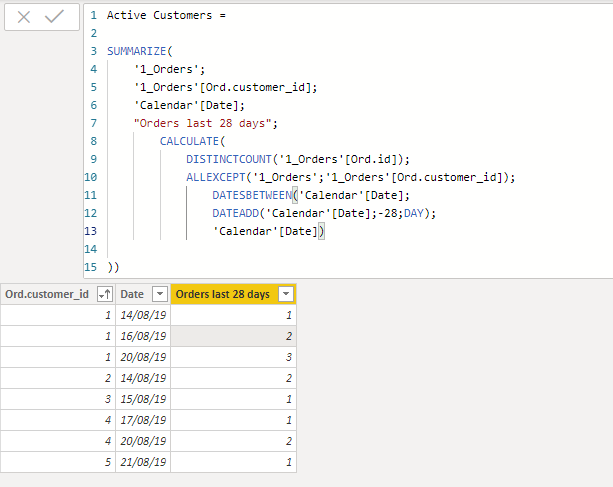
I gave it a try and that's the solution that worked for me. You will see that I used DatesBetween instead of DatesinPeriod. But I'm sure that it may work in both ways.


Below the results I got.


Hope it helps.


Annotation 2019-11-22 174842.png

View solution in original post

4 REPLIES 4
v-frfei-msft
Community Support
Community Support

Hi @Mattonpowerbi ,


Kindly share your sample data and excepted result to me if you don't have any Confidential Information. Please upload your files to One Drive and share the link here.


Community Support Team _ Frank
If this post helps, then please consider Accept it as the solution to help the others find it more quickly.

Hi @v-frfei-msft ,


Unfortunately I can't share the underlying data, however I've created two dummy tables in this excel sheet. The table on the left, '1_Orders', is the main base table I'm using (in conjunction with a dates table). The table on the right, 'Active customers', is the expected outcome, which I'm not currently getting.


Essentially, I would like to look at each customer and for each date, sum the # orders they had in the preceding 28 days. I'm not sure if I've gone about it in the right way, but that is the goal 🙂


Thanks a lot for your help! 

Anonymous
Not applicable

Hey,


I gave it a try and that's the solution that worked for me. You will see that I used DatesBetween instead of DatesinPeriod. But I'm sure that it may work in both ways.


Below the results I got.


Hope it helps.


Annotation 2019-11-22 174842.png

Hey @Anonymous , that's perfect, thanks a lot 🙂 I'm not sure why what I had done didn't work, I'll have a think about that one!

Helpful resources

Announcements
Power BI DataViz World Championships

Power BI Dataviz World Championships

The Power BI Data Visualization World Championships is back! Get ahead of the game and start preparing now!

December 2025 Power BI Update Carousel

Power BI Monthly Update - December 2025

Check out the December 2025 Power BI Holiday Recap!

FabCon Atlanta 2026 carousel

FabCon Atlanta 2026

Join us at FabCon Atlanta, March 16-20, for the ultimate Fabric, Power BI, AI and SQL community-led event. Save $200 with code FABCOMM.