Get certified for free when you join Fabric Data Days 2026 and dive into Fabric, Power BI, SQL, AI, and other essential data skills.
Join nowJuly 7 - July 17 | Round 2 of the Power BI Dataviz World Championships. Don't miss your chance! Learn more
Hello,
I have the following two tables loaded in Power Query and i am trying to add a new column to the first table for "Converted to DKK" based on the currency exchange rates in the second table. Is this possible to do in Power Query? Any help is much appreciated!
| Document ID | Date | Total | Currrency |
| 4000283 | 04/08/2022 | 2805 | DKK |
| 1201527 | 04/08/2022 | 1258 | EUR |
| 2201527 | 01/08/2022 | 518841 | USD |
| 1174756 | 15/07/2022 | 51514 | NOK |
| 1174759 | 20/07/2022 | 15145 | GBP |
| 3174762 | 15/07/2022 | 54144 | USD |
| 2169960 | 05/07/2022 | 5154 | DKK |
| 4170033 | 05/07/2022 | 8785 | EUR |
| 4188166 | 15/07/2022 | 32595 | GBP |
| 1176983 | 06/07/2022 | 5665 | SEK |
| 1176755 | 15/07/2022 | 7841 | DKK |
| 3176759 | 15/07/2022 | 69792 | EUR |
| 2176785 | 15/07/2022 | 9632 | USD |
| 3176813 | 15/07/2022 | 55849 | USD |
| 1176818 | 15/07/2022 | 1895 | EUR |
| 1176830 | 15/07/2022 | 65894 | NOK |
| 1188166 | 15/07/2022 | 65612 | GBP |
| 4144970 | 04/07/2022 | 5645 | DKK |
| 4000429 | 14/07/2022 | 78000 | SEK |
| 1176478 | 15/07/2022 | 319000 | GBP |
| 4000138 | 15/07/2022 | 374000 | DKK |
| Currency | Converted to DKK |
| 1 USD | 7.72 |
| 1 EUR | 7.44 |
| 1 GBP | 8.32 |
| 1 NOK | 0.72 |
| 1 SEK | 0.68 |
Solved! Go to Solution.
Hi @Anonymous ,
According to your description, here's my solution.
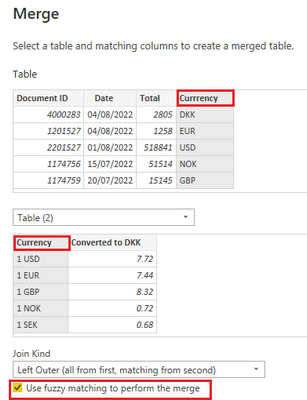
Select the first table, then click Home>Merge Queries.
Select Currency column in the two tables and select the option "Use fuzzy matching to perform the merge", as in your sample, the currency columns in two tables are not totally the same.
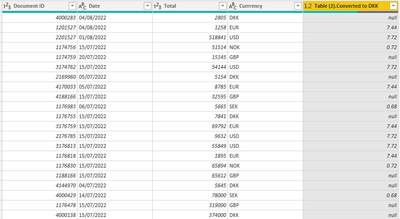
Then expand the Converted to DDK column, get the result.
I attach my sample below for your reference.
Best Regards,
Community Support Team _ kalyj
If this post helps, then please consider Accept it as the solution to help the other members find it more quickly.
Hi @Anonymous ,
According to your description, here's my solution.
Select the first table, then click Home>Merge Queries.
Select Currency column in the two tables and select the option "Use fuzzy matching to perform the merge", as in your sample, the currency columns in two tables are not totally the same.
Then expand the Converted to DDK column, get the result.
I attach my sample below for your reference.
Best Regards,
Community Support Team _ kalyj
If this post helps, then please consider Accept it as the solution to help the other members find it more quickly.
You would just "Join" (Table.Join or Table.NestedJoin) the two tables, and multiply the columns.
Join us in Barcelona for FabCon and SQLCon, the Fabric, Power BI, SQL, and AI community event. Save €200 with code FABCMTY200.
Join Data Days 2026: 60 days of free live/on-demand sessions, challenges, study groups, and certification opportunities.