Join us at FabCon Atlanta from March 16 - 20, 2026, for the ultimate Fabric, Power BI, AI and SQL community-led event. Save $200 with code FABCOMM.
Register now!Learn from the best! Meet the four finalists headed to the FINALS of the Power BI Dataviz World Championships! Register now
Hi,
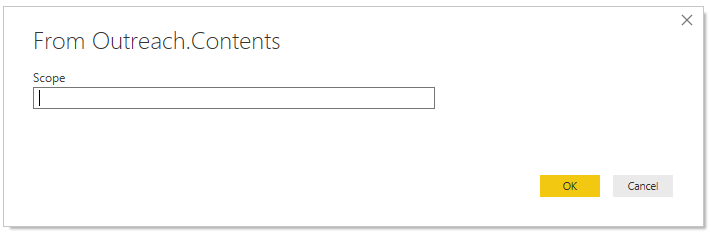
I have a custom data connector that currently requires the user to enter a string to specify the scope of data they wish to pull when adding the query. There are 37 possible values and I'd like to present the user with a dropdown menu instead of a text input box. I haven't been able to find any documentation on this. Is it possible?
For example, the current prompt for users adding this connector:
Solved! Go to Solution.
Hi @ChadC
There are some threads discussing about this problem, you may have a look:
https://community.powerbi.com/t5/Developer/Custom-data-connector-SDK-help-required/m-p/547696#M17057
https://community.powerbi.com/t5/Desktop/Custom-Data-Connector-UI-Dropdown-list/td-p/484102
Best Regards
Maggie
Community Support Team _ Maggie Li
If this post helps, then please consider Accept it as the solution to help the other members find it more quickly.
Hi @ChadC
There are some threads discussing about this problem, you may have a look:
https://community.powerbi.com/t5/Developer/Custom-data-connector-SDK-help-required/m-p/547696#M17057
https://community.powerbi.com/t5/Desktop/Custom-Data-Connector-UI-Dropdown-list/td-p/484102
Best Regards
Maggie
Community Support Team _ Maggie Li
If this post helps, then please consider Accept it as the solution to help the other members find it more quickly.
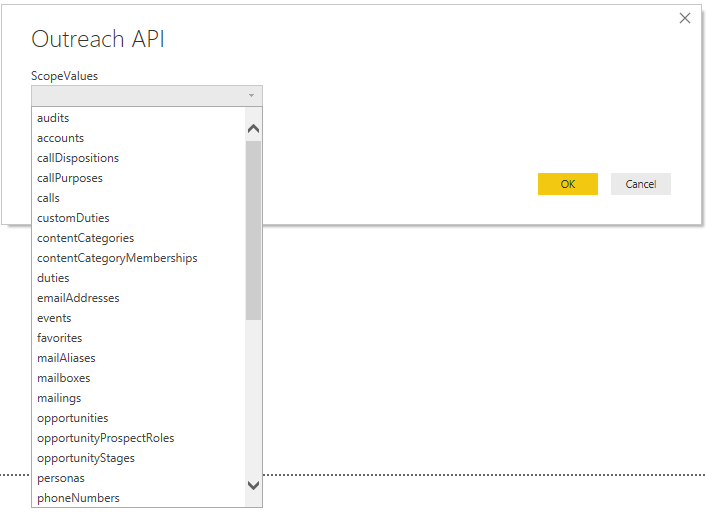
Thanks for the help @v-juanli-msft . I was able to implement a dropdown menu using the link below which was mentioned in the first post you provided.
My code snippet for future reference:
[DataSource.Kind="Outreach", Publish="Outreach.Publish"]
shared Outreach.Contents = Value.ReplaceType(ScopeImpl, ScopeType);
ScopeType = type function(
ScopeValues as (type text meta [
Documentation.Description = "Select a scope.",
Documentation.SampleValues = {"users"},
Documentation.AllowedValues = {"audits","accounts","callDispositions","callPurposes","calls","customDuties","contentCategories","contentCategoryMemberships","duties","emailAddresses","events","favorites","mailAliases","mailboxes","mailings","opportunities","opportunityProspectRoles","opportunityStages","personas","phoneNumbers","profiles","prospects","recipients","roles","rulesets","sequenceStates","sequenceSteps","sequenceTemplates","sequences","snippets","stages","taskPriorities","tasks","teams","templates","users","webhooks"}
]))
as table meta [
Documentation.Name = "Outreach API"
];
ScopeImpl = (Scope as text) =>
let
source = Json.Document(Web.Contents(api_source_uri & Scope))
in
source;The following replaces the dialog that I originally posted:
Share feedback directly with Fabric product managers, participate in targeted research studies and influence the Fabric roadmap.
Check out the February 2026 Power BI update to learn about new features.