Share feedback directly with Fabric product managers, participate in targeted research studies and influence the Fabric roadmap.
Sign up nowGet Fabric certified for FREE! Don't miss your chance! Learn more
Hi,
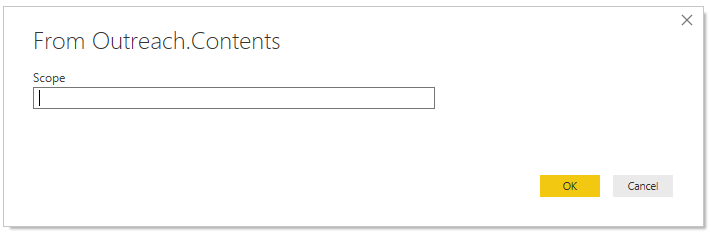
I have a custom data connector that currently requires the user to enter a string to specify the scope of data they wish to pull when adding the query. There are 37 possible values and I'd like to present the user with a dropdown menu instead of a text input box. I haven't been able to find any documentation on this. Is it possible?
For example, the current prompt for users adding this connector:
Solved! Go to Solution.
Hi @ChadC
There are some threads discussing about this problem, you may have a look:
https://community.powerbi.com/t5/Developer/Custom-data-connector-SDK-help-required/m-p/547696#M17057
https://community.powerbi.com/t5/Desktop/Custom-Data-Connector-UI-Dropdown-list/td-p/484102
Best Regards
Maggie
Community Support Team _ Maggie Li
If this post helps, then please consider Accept it as the solution to help the other members find it more quickly.
Hi @ChadC
There are some threads discussing about this problem, you may have a look:
https://community.powerbi.com/t5/Developer/Custom-data-connector-SDK-help-required/m-p/547696#M17057
https://community.powerbi.com/t5/Desktop/Custom-Data-Connector-UI-Dropdown-list/td-p/484102
Best Regards
Maggie
Community Support Team _ Maggie Li
If this post helps, then please consider Accept it as the solution to help the other members find it more quickly.
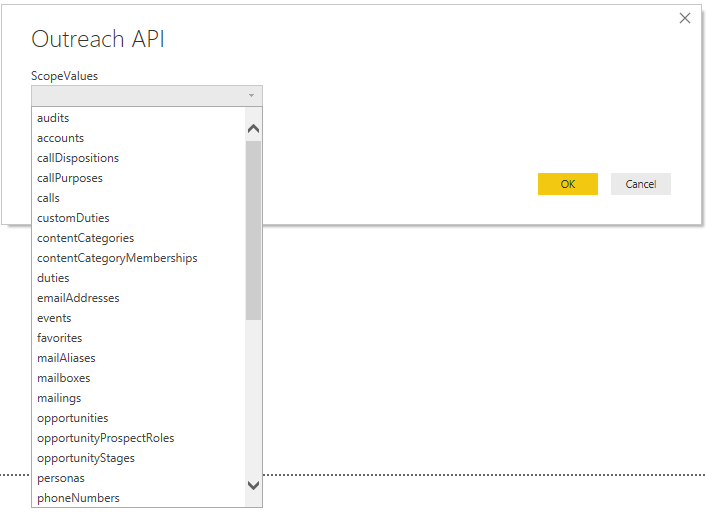
Thanks for the help @v-juanli-msft . I was able to implement a dropdown menu using the link below which was mentioned in the first post you provided.
My code snippet for future reference:
[DataSource.Kind="Outreach", Publish="Outreach.Publish"]
shared Outreach.Contents = Value.ReplaceType(ScopeImpl, ScopeType);
ScopeType = type function(
ScopeValues as (type text meta [
Documentation.Description = "Select a scope.",
Documentation.SampleValues = {"users"},
Documentation.AllowedValues = {"audits","accounts","callDispositions","callPurposes","calls","customDuties","contentCategories","contentCategoryMemberships","duties","emailAddresses","events","favorites","mailAliases","mailboxes","mailings","opportunities","opportunityProspectRoles","opportunityStages","personas","phoneNumbers","profiles","prospects","recipients","roles","rulesets","sequenceStates","sequenceSteps","sequenceTemplates","sequences","snippets","stages","taskPriorities","tasks","teams","templates","users","webhooks"}
]))
as table meta [
Documentation.Name = "Outreach API"
];
ScopeImpl = (Scope as text) =>
let
source = Json.Document(Web.Contents(api_source_uri & Scope))
in
source;The following replaces the dialog that I originally posted:
Share feedback directly with Fabric product managers, participate in targeted research studies and influence the Fabric roadmap.
If you love stickers, then you will definitely want to check out our Community Sticker Challenge!
Check out the January 2026 Power BI update to learn about new features.
| User | Count |
|---|---|
| 13 | |
| 11 | |
| 11 | |
| 7 | |
| 6 |