Have you worked with an Excel or CSV file that changes slightly their column names? Whatever the reason, this seems to make your Power BI refresh crash.
As you know, Power Query is very susceptible to any change, especially using Functions such as Table.ReorderColumns or Table.SelectRows.
To solve that problem we have developed a function called ColumnStandardizer. The idea as the name suggests is to standardize a set of columns from a given table based on a list of predefined columns.
Example #1
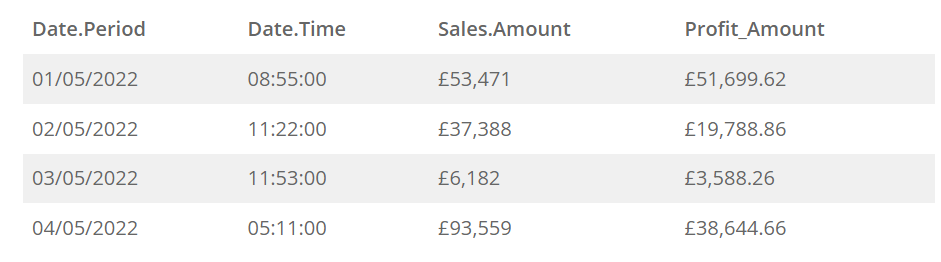
Assuming receiving a monthly table like the one below.
The column headers are roughly the same, but rarely are exactly the same, so appending a folder will not work as expected.
Standard Names
The first step is to decide on the standard names of your columns. We have defined the ones for the table above.
- Date Period
- Date Time
- Sales Amount
- Profit Amount
That means we have removed unnecessary characters and added a space for clarity.
How to use the function
Steps
- Define your standard columns as a list.
- Get the columns name as a list from your table.
- Pass the two lists to ColumnStandardizer.
To simplify the code I’ve used Source = Table.
let
  Source = Table,
  GetColumnNames = Table.ColumnNames(Source),
  RenameList = ColumnStandardizer(
    GetColumnNames,
    {"Date Period", "Date Time", "Sales Amount", "Profit Amount"}
  ),
  ReplaceColumnNames = Table.RenameColumns(Source, RenameList)
in
  ReplaceColumnNames
The second argument of ColumnStandardizer defines the standard list of columns {"Date Period", "Date Time", "Sales Amount", "Profit Amount"}. This can be also defined in a Power Query variable as we did.
Example #2
The same example as before, the only difference is we have an additional column we weren’t expecting, Margin.
Date.Period Date.Time Sales.Amount Profit_Amount Margin
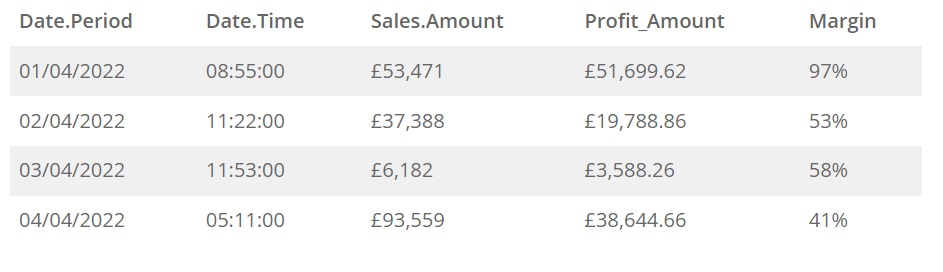
Well, that’s not a problem. We can do the same we did before, and we just need to add an additional step with Table.SelectColumns.
Basically, because we have standardised the column names, and we have defined that list beforehand, we use the list again in Table.SelectColumns
let
  Source = Table,
  GetColumnNames = Table.ColumnNames(Source),
  StandardColumns = {"Date Period", "Date Time", "Sales Amount", "Profit Amount"},
  RenameList = ColumnStandardizer(GetColumnNames, StandardColumns),
  ReplaceColumnNames = Table.RenameColumns(
    Source,
    ColumnStandardizer(
      GetColumnNames,
      {"Date Period", "Date Time", "Sales Amount", "Profit Amount"}
    )
  ),
  SelectColumns = Table.SelectColumns(ReplaceColumnNames, StandardColumns)
in
  SelectColumns
Source
- The code is stored on Github:
https://github.com/acanepas/ColumnStandardizer - Power BI Sample
https://github.com/acanepas/ColumnStandardizer/blob/main/ColumnStandardizer%20Example.pbix


