Hi,
I am working on a custom connector for Power Bi to get Data from multiple APIs.
The user could select the API instance then the list of all available tables in this API should be shown in a list field. Then write the desired query in the Query field.
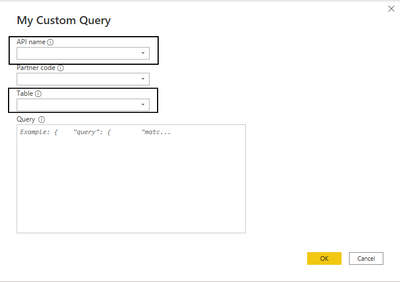
Actually I could show the of the list of tables when I hardcoded them in my code.
I want to dynalically show the tables depending on the selected API.
for example:
API 1 => table1, table2
API 2 => table3, table4, table5...
I use a function to get this list.
My question is how to render the list of table so it shows the table dynamically without hardcode it!
The hardcoded list of tables:

MyQueryType = type function (

APIType as (type text meta [
        Documentation.FieldCaption = "API name",
        Documentation.FieldDescription = "Enter the API name",
        Documentation.AllowedValues = { "BS_PARAMETER", "Elastic API DSL", "Elastic API SQL" }
        //Documentation.AllowedValues = Indices2

        ]),
PartnerCodeType as (type text meta [
        Documentation.FieldCaption = "Partner code",
        Documentation.FieldDescription = "Enter the partner code",
        Documentation.AllowedValues = { "jp_demo", "bilan_sanguin" }
        ]),
TableType as (type text meta [
        Documentation.FieldCaption = "Table",
        Documentation.FieldDescription = "Enter you query",
        Documentation.AllowedValues = { "table1", "table2", "table3", "table4", "table5" }
        ]),
QueryType as (type text meta [
        Documentation.FieldCaption = "Query",
        Documentation.FieldDescription = "Enter you query",
        Documentation.SampleValues = { "{    ""query"": {        ""match_all"":{}    }}" },
        Formatting.IsMultiLine = true
        ])


    )
    as table meta [
        Documentation.Name = "My Custom Query",
        Documentation.LongDescription = "Long Desc"
        ];
I created a function Indices() that gets the list of table for each API then I call it in the MyQueryType function:
MyQueryType = type function (

APIType as (type text meta [
        Documentation.FieldCaption = "API name",
        Documentation.FieldDescription = "Enter the API name",
        Documentation.AllowedValues = { "BS_PARAMETER", "Elastic API DSL", "Elastic API SQL" }
        //Documentation.AllowedValues = Indices2

        ]),
PartnerCodeType as (type text meta [
        Documentation.FieldCaption = "Partner code",
        Documentation.FieldDescription = "Enter the partner code",
        Documentation.AllowedValues = { "jp_demo", "bilan_sanguin" }
        ]),
TableType as (type text meta [
        Documentation.FieldCaption = "Table",
        Documentation.FieldDescription = "dec",
        Documentation.AllowedValues = Indices()
        ]),
QueryType as (type text meta [
        Documentation.FieldCaption = "Query",
        Documentation.FieldDescription = "Enter you query",
        Documentation.SampleValues = { "{    ""query"": {        ""match_all"":{}    }}" },
        Formatting.IsMultiLine = true
        ])


    )
    as table meta [
        Documentation.Name = "My Custom Query",
        Documentation.LongDescription = "Long Desc"
        ];

//Other code snippet

//Get ES Metadata: indexes
Indices =
        let
            api_url = "http://MyURL:9200/_cat/indices?format=json",
            response = Web.Contents(api_url),
            source = Json.Document(response),
            #"Converted to Table" = Table.FromList(source, Splitter.SplitByNothing(), null, null, ExtraValues.Error),
            #"Expanded Column1" = Table.ExpandRecordColumn(#"Converted to Table", "Column1", {"index"}, {"Column1.index"}),
            #"Changed Type" = Table.TransformColumnTypes(#"Expanded Column1",{{"Column1.index", type text}}),
            mylist = Table.ToList(#"Expanded Column1")
            //mylistb = Table.TransformColumnTypes(mylist,{{"Column1.index", type text}})
            //totext = Text.Combine(mylist, ",")
    in
            //#"Changed Type";
            mylist;
This question is already asked but no solution is given until today!
https://community.powerbi.com/t5/Desktop/Custom-Data-Connector-UI-Dropdown-list/td-p/484102


