
Join us at FabCon Atlanta from March 16 - 20, 2026, for the ultimate Fabric, Power BI, AI and SQL community-led event. Save $200 with code FABCOMM.
Register now!The Power BI Data Visualization World Championships is back! Get ahead of the game and start preparing now! Learn more
I'm not one for nested IF statements but some help would be nice.
I have a table with 4 columns (A1-4)
I want to create a custom column that takes the value from the right most column if not null
So I want to do the following:
IF A4 = null THEN A3 ELSE A4
IF A3 = null THEN A2 ELSE A3
IF A2 = null THEN A1 ELSE A2
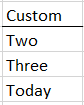
The end result should look like this:
Solved! Go to Solution.
Hi @DSwezey ,
You can try the following in a new custom column:
List.Last(List.RemoveNulls({[A1], [A2], [A3], [A4]}))
Pete
Proud to be a Datanaut!
Hi @DSwezey ,
You can try the following in a new custom column:
List.Last(List.RemoveNulls({[A1], [A2], [A3], [A4]}))
Pete
Proud to be a Datanaut!
This only pulled values from the [A4] column
Hi,
Sorry, I forgot to remove nulls. I've updated my original post 🙂
Proud to be a Datanaut!
The Power BI Data Visualization World Championships is back! Get ahead of the game and start preparing now!