
cancel
Showing results for 
Search instead for 
Did you mean: 

The Power BI Data Visualization World Championships is back! Get ahead of the game and start preparing now! Learn more

Reply
Anonymous
Not applicable

Custom Column Measure required for a complex data set

Hi All,


I am new to power bi, so need your help in creating a reporting.


Sample Table data:


shauryasushant_0-1601108506935.png


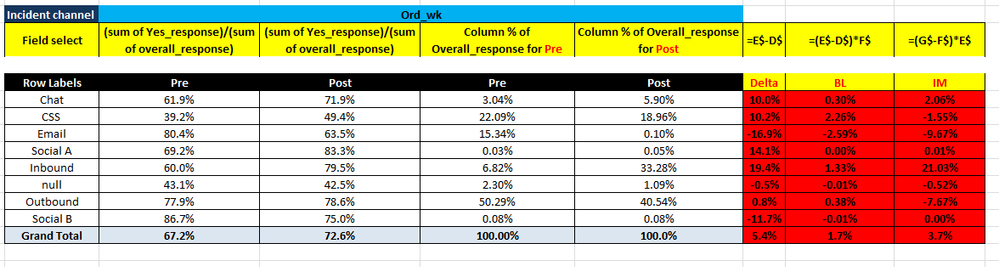
Required Report format:


shauryasushant_1-1601108788034.png

The above is the formula used in the excel, similar view wanted to create in power bi for diff fields. I want to calculate Delta, BL & IM.


Please help me ASAP. 


1 ACCEPTED SOLUTION
Icey
Community Support
Community Support

Hi @Anonymous ,


Please refer to these posts: 

Difference between Column Values in Matrix Visual;

Custom aggregate column in power bi matrix;

YoY Growth in Different Section in Matrix Table.


Best Regards,

Icey


If this post helps, then please consider Accept it as the solution to help the other members find it more quickly.

View solution in original post

2 REPLIES 2
Icey
Community Support
Community Support

Hi @Anonymous ,


Please refer to these posts: 

Difference between Column Values in Matrix Visual;

Custom aggregate column in power bi matrix;

YoY Growth in Different Section in Matrix Table.


Best Regards,

Icey


If this post helps, then please consider Accept it as the solution to help the other members find it more quickly.

Greg_Deckler
Community Champion
Community Champion

@Anonymous Sorry, having trouble following, can you post sample data as text?


Not really enough information to go on, please first check if your issue is a common issue listed here: https://community.powerbi.com/t5/Community-Blog/Before-You-Post-Read-This/ba-p/1116882

Also, please see this post regarding How to Get Your Question Answered Quickly: https://community.powerbi.com/t5/Community-Blog/How-to-Get-Your-Question-Answered-Quickly/ba-p/38490

The most important parts are:
1. Sample data as text, use the table tool in the editing bar
2. Expected output from sample data
3. Explanation in words of how to get from 1. to 2.


Follow on LinkedIn
@ me in replies or I'll lose your thread!!!
Instead of a Kudo, please vote for this idea
Become an expert!: Enterprise DNA
External Tools: MSHGQM
YouTube Channel!: Microsoft Hates Greg
Latest book!:
DAX For Humans

DAX is easy, CALCULATE makes DAX hard...

Helpful resources

Announcements
Power BI DataViz World Championships

Power BI Dataviz World Championships

The Power BI Data Visualization World Championships is back! Get ahead of the game and start preparing now!

December 2025 Power BI Update Carousel

Power BI Monthly Update - December 2025

Check out the December 2025 Power BI Holiday Recap!

FabCon Atlanta 2026 carousel

FabCon Atlanta 2026

Join us at FabCon Atlanta, March 16-20, for the ultimate Fabric, Power BI, AI and SQL community-led event. Save $200 with code FABCOMM.

Top Solution Authors