cancel
Showing results for 
Search instead for 
Did you mean: 

The Power BI Data Visualization World Championships is back! It's time to submit your entry. Live now!

Reply
Matt0515
Frequent Visitor

Custom Column In Power Query Where Blanks Exist (Dates)

Hello Experts, I am hoping you can help me create a column that will return blank where blank information exists.


I have binary dates in my data set.


binary example: Close Date = 27.2.2020

I have created 3 custom columns for each piece of information.

1) Close Day = 27

2) Close Month = 2

3) Close Year = 2020

I then created a custom column to combine the information in a format that allows me to convert the column to date format of MM/DD/YYYY

Text.Combine({[Created Month]&"/",[Created Day]&"/",[Created Year]})

Result of column logic = 2/27/2020 - I can then format the column to date which results in 02/27/2020


What I cant figure out is how I to modify the custom column logic to return a blank value where "Close Day, Month, Year" are blank because the way I have it set up now returns a value of "//" and creates an error in my column.


Any help to enhance my custom column to return data where it exists and blanks where it doesnt would be greatly apprechiated!


Thank you experts!


Matt


1 ACCEPTED SOLUTION
nandic
Resident Rockstar
Resident Rockstar

@Matt0515 ,
If during import of data Power BI doesn't recognize your date column as date, you should try to convert column to date using locale option.
Right click on column > locale > data type = date, locale (choose your region). 
In order this to work, make sure that your pc settings (region settings) is set to your actual region.

If you would like to continue with current approach i suppose your year, month, day columns are numbers?
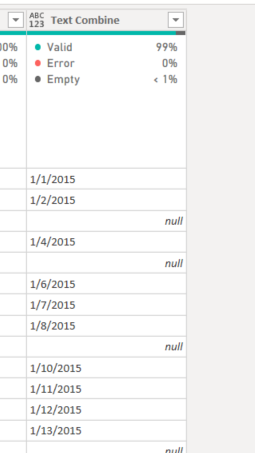
Try this formula, it will automatically return null of no date conversion is possible:
Text combine = Number.ToText([Month]) & "/" & Number.ToText([Day]) &"/" & Number.ToText([Year])
date null 1.PNG


View solution in original post

2 REPLIES 2
edhans
Community Champion
Community Champion

Wrap your entire function with a try/otherwise construct.


try Date.FromText(Text.Combine({[Created Month]&"/",[Created Day]&"/",[Created Year]}))
otherwise null


If an error is returned, the "otherwise" kicks in and will return null. 

EDIT: you need to include the date conversion too, as the Text.Combine will never return an error as it doesn't care about date formats.


Did I answer your question? Mark my post as a solution!
Did my answers help arrive at a solution? Give it a kudos by clicking the Thumbs Up!

DAX is for Analysis. Power Query is for Data Modeling


Proud to be a Super User!

MCSA: BI Reporting
nandic
Resident Rockstar
Resident Rockstar

@Matt0515 ,
If during import of data Power BI doesn't recognize your date column as date, you should try to convert column to date using locale option.
Right click on column > locale > data type = date, locale (choose your region). 
In order this to work, make sure that your pc settings (region settings) is set to your actual region.

If you would like to continue with current approach i suppose your year, month, day columns are numbers?
Try this formula, it will automatically return null of no date conversion is possible:
Text combine = Number.ToText([Month]) & "/" & Number.ToText([Day]) &"/" & Number.ToText([Year])
date null 1.PNG


Helpful resources

Announcements
December 2025 Power BI Update Carousel

Power BI Monthly Update - December 2025

Check out the December 2025 Power BI Holiday Recap!

FabCon Atlanta 2026 carousel

FabCon Atlanta 2026

Join us at FabCon Atlanta, March 16-20, for the ultimate Fabric, Power BI, AI and SQL community-led event. Save $200 with code FABCOMM.