cancel
Showing results for 
Search instead for 
Did you mean: 

July 7 - July 17 | Round 2 of the Power BI Dataviz World Championships. Don't miss your chance! Learn more

Reply
SandraGDS
New Member

CurrentIndex -1

Hi 
 
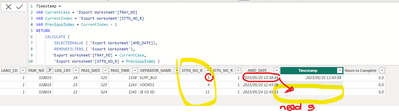
I need help, i want to say "if the ProcessNumber currentIndex -1 does'nt exist then -1 again untill found"
 
Timestamp =
VAR CurrentCase = 'Export Worksheet'[Order]
VAR CurrentIndex = 'Export Worksheet'[ProcessNumber]
VAR PreviousIndex = CurrentIndex - 1
RETURN
    CALCULATE (
        SELECTEDVALUE ( 'Export Worksheet'[DATE]),
        REMOVEFILTERS ( 'Export Worksheet'),
       'Export Worksheet'[Order] = CurrentCase,
        'Export Worksheet'[ProcessNumber] = PreviousIndex)
1 ACCEPTED SOLUTION
v-jingzhang
Community Support
Community Support

Hi @SandraGDS 


Please use this measure:

Timestamp =
VAR CurrentCase = 'Export Worksheet'[TRAY_NO]
VAR CurrentIndex = 'Export Worksheet'[STTN_NO_R]
VAR PreviousIndex =
    CALCULATE (
        MAX ( 'Export Worksheet'[STTN_NO_R] ),
        REMOVEFILTERS ( 'Export Worksheet' ),
        'Export Worksheet'[TRAY_NO] = CurrentCase,
        'Export Worksheet'[STTN_NO_R] < CurrentIndex
    )
RETURN
    CALCULATE (
        SELECTEDVALUE ( 'Export Worksheet'[AMD_DATE] ),
        REMOVEFILTERS ( 'Export Worksheet' ),
        'Export Worksheet'[TRAY_NO] = CurrentCase,
        'Export Worksheet'[STTN_NO_R] = PreviousIndex
    )


Best Regards,
Community Support Team _ Jing
If this post helps, please Accept it as Solution to help other members find it.

View solution in original post

2 REPLIES 2
v-jingzhang
Community Support
Community Support

Hi @SandraGDS 


Please use this measure:

Timestamp =
VAR CurrentCase = 'Export Worksheet'[TRAY_NO]
VAR CurrentIndex = 'Export Worksheet'[STTN_NO_R]
VAR PreviousIndex =
    CALCULATE (
        MAX ( 'Export Worksheet'[STTN_NO_R] ),
        REMOVEFILTERS ( 'Export Worksheet' ),
        'Export Worksheet'[TRAY_NO] = CurrentCase,
        'Export Worksheet'[STTN_NO_R] < CurrentIndex
    )
RETURN
    CALCULATE (
        SELECTEDVALUE ( 'Export Worksheet'[AMD_DATE] ),
        REMOVEFILTERS ( 'Export Worksheet' ),
        'Export Worksheet'[TRAY_NO] = CurrentCase,
        'Export Worksheet'[STTN_NO_R] = PreviousIndex
    )


Best Regards,
Community Support Team _ Jing
If this post helps, please Accept it as Solution to help other members find it.

SandraGDS
New Member

SandraGDS_0-1685023037171.png


Helpful resources

Announcements
FabCon and SQLCon Barcelona 2026

FabCon & SQLCon – Barcelona 2026

Join us in Barcelona for FabCon and SQLCon, the Fabric, Power BI, SQL, and AI community event. Save €200 with code FABCMTY200.

60 days of Data Days Carousel

Data Days 2026

Join Fabric Data Days 2026: 60 days of free live/on-demand sessions, challenges, study groups, and certification opportunities.

Power BI DataViz World Championships carousel

Power BI DataViz World Championships - June 2026

A new Power BI DataViz World Championship is coming this June! Don't miss out on submitting your entry.