Get certified for free when you join Fabric Data Days 2026 and dive into Fabric, Power BI, SQL, AI, and other essential data skills.
Join nowTry your skills in the Power BI Dataviz World Championship! Round one ends June 26. Join now
Hello all,
could you please help me with the issue below?
I need to add column:
where is actual date - give me date in current month but with first day of month.
For example today is 2022-07-28 and I need to get 2022-07-01. I need to set it up as dynamic report. It means when somebody downloand report on 2022-09-15, I will need to get 2022-09-01.
We could use this condition in SQL language:
date_of_day IN (Current_Date - Extract (DAY From Current_Date) + 1)
Thank you in advance!
Solved! Go to Solution.
Hi,
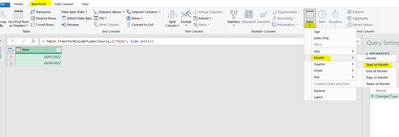
This might do it
let
Source = Excel.CurrentWorkbook(){[Name="Table1"]}[Content],
#"Changed Type" = Table.TransformColumnTypes(Source,{{"Date", type date}}),
#"Calculated Start of Month" = Table.TransformColumns(#"Changed Type",{{"Date", Date.StartOfMonth, type date}})
in
#"Calculated Start of Month"
Thanks,
PS just realised you said add a column so just duplicate your current date column first 🙂
Hi @Anonymous ,
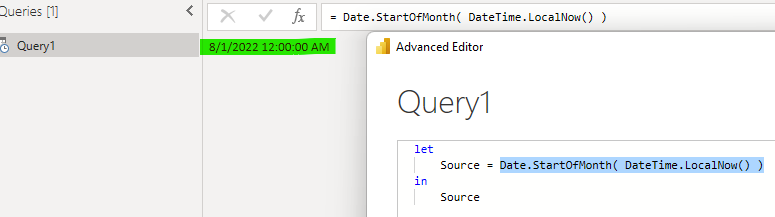
Please open a blank query and paste the code.
let
Source = Date.StartOfMonth( DateTime.LocalNow() )
in
Source
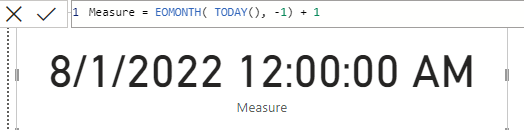
And you can also create a measure to get date.
Measure = EOMONTH( TODAY(), -1) + 1
If the problem is still not resolved, please provide detailed error information or the expected result you expect. Let me know immediately, looking forward to your reply.
Best Regards,
Winniz
If this post helps, then please consider Accept it as the solution to help the other members find it more quickly.
Hi @Anonymous ,
Please open a blank query and paste the code.
let
Source = Date.StartOfMonth( DateTime.LocalNow() )
in
Source
And you can also create a measure to get date.
Measure = EOMONTH( TODAY(), -1) + 1
If the problem is still not resolved, please provide detailed error information or the expected result you expect. Let me know immediately, looking forward to your reply.
Best Regards,
Winniz
If this post helps, then please consider Accept it as the solution to help the other members find it more quickly.
Hi,
This might do it
let
Source = Excel.CurrentWorkbook(){[Name="Table1"]}[Content],
#"Changed Type" = Table.TransformColumnTypes(Source,{{"Date", type date}}),
#"Calculated Start of Month" = Table.TransformColumns(#"Changed Type",{{"Date", Date.StartOfMonth, type date}})
in
#"Calculated Start of Month"
Thanks,
PS just realised you said add a column so just duplicate your current date column first 🙂
Don't miss out on Data Days, June 15 through August 7. Learn Fabric, Power BI, SQL, AI and more.
Check out the May 2026 Power BI update to learn about new features.
| User | Count |
|---|---|
| 3 | |
| 3 | |
| 3 | |
| 2 | |
| 2 |
| User | Count |
|---|---|
| 11 | |
| 9 | |
| 5 | |
| 5 | |
| 4 |